Writing / ai engineering
I Built an AI Development Team in My Terminal
Projectinator turns one app idea into a Scrum backlog, working files, and a browser-tested result. Here is how the pipeline works, what it costs, and where it still needs human judgment.

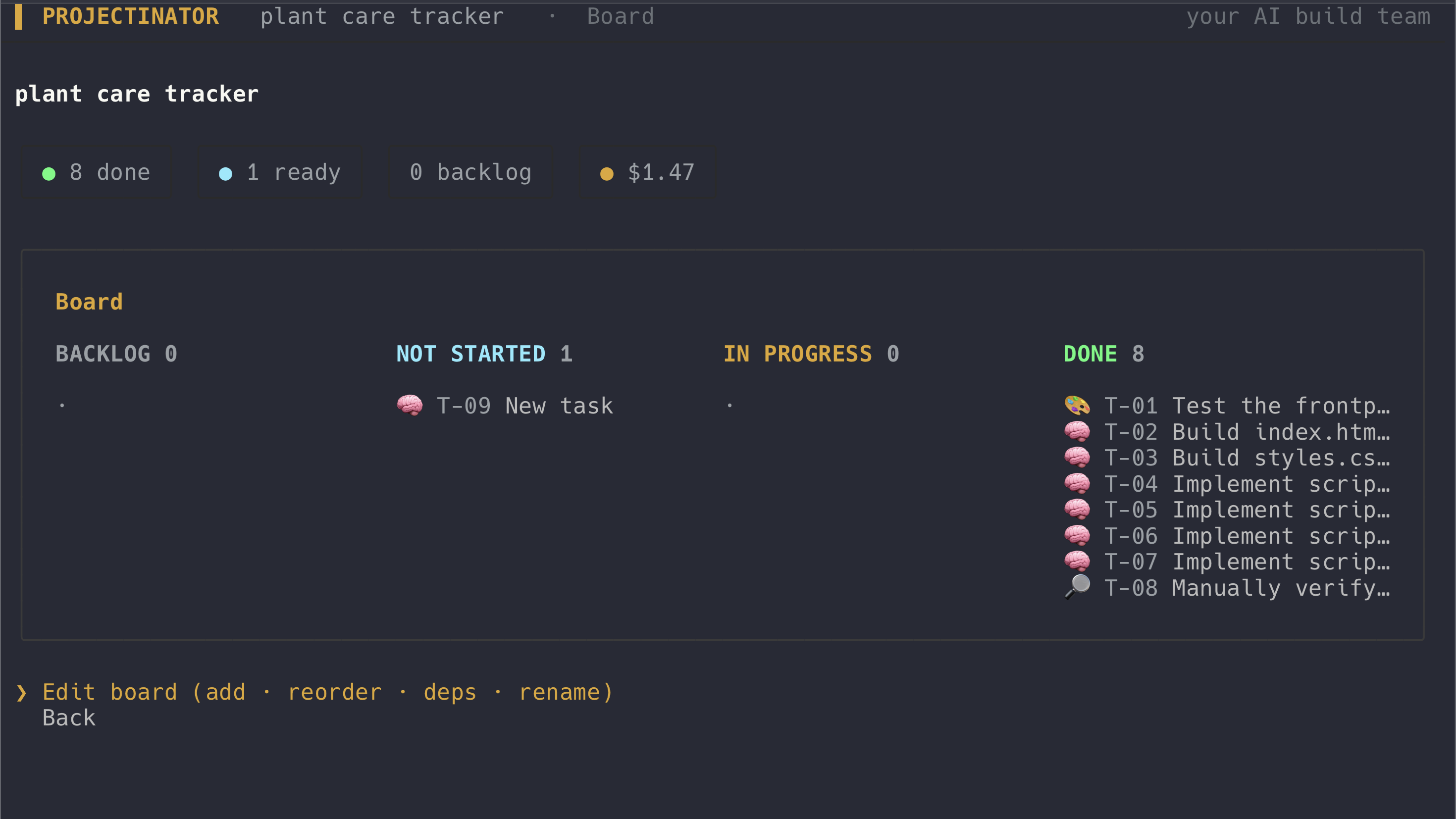
So here is the thing. Asking an AI model to build an app is not difficult anymore.
You describe what you want, wait a little, and get a folder full of code. Sometimes it even works.
But that is not how I would run a real software project. I would not give one person a vague sentence and ask them to plan the work, make every design decision, write every file, test their own result, and tell me whether it is good.
That is basically the problem I wanted to explore with Projectinator.
Projectinator is an open-source terminal app where AI models work as a small build team. You give it an app idea. A project-manager model turns the idea into a Scrum backlog. The tasks go through planning, design, development, and testing. The developer writes real files, the tester opens the result in a headless browser, and you watch the work and cost from a terminal cockpit.
You are still the project manager. The models do the build work.
This is a pipeline, not an AI group chat
The word “multi-agent” can mean almost anything now. In some systems, several models talk to each other until somebody decides the answer looks finished.
Projectinator is more controlled than that.
The PM produces tasks with capabilities and dependencies. A task can be planning, design, code, testing, or operations. The orchestrator puts those tasks into dependency order and only starts work when the tasks it depends on are finished.
The simplified flow looks like this:
idea
  -> clarify
  -> plan backlog
  -> approve
  -> design
  -> develop
  -> test in Chromium
  -> fix and retest when needed
  -> working files
Each stage receives the relevant result from its dependencies. The designer can define the file structure. The developer sees that design and the files already in the workspace. The tester sees the built project and gets a different set of tools.
This distinction matters. The roles are not personalities added for decoration. They create boundaries around what each model should do.
The designer does not write code. The tester does not quietly repair the developer’s mistakes and then report a pass. The developer can write and edit files, while the tester inspects them and submits a structured pass-or-fail verdict.
That makes the workflow easier to understand and, more importantly, easier to test.
The PM does more than create a list
A one-line idea is usually not enough to build the right thing.
If I say “build a recipe manager,” there are already several unanswered questions. Does it need accounts? Should it store recipes locally? Can users search? Are we building a small static app or something with a backend?
Projectinator has an optional intake step for that. When the request is vague, the PM asks a small number of clarifying questions. When the request is already specific, it can move directly to planning.
The PM then returns a structured backlog. Every task has:
- an ID
- a title
- a capability
- a difficulty
- an epic
- dependencies on other tasks
The structure is important because the execution order should not depend on whichever task happens to appear first in a paragraph.
Before the build starts, Projectinator normalizes the backlog, removes duplicate task IDs, strips dependencies that point nowhere, and checks for dependency cycles. If the plan says task A depends on task B while task B depends on task A, the build stops instead of pretending it can continue.
There are two planning modes. Quick planning uses one PM. Deep planning asks architecture, product, and risk roles to propose epics in parallel, then a synthesizer merges their work. I like the idea, but I would not use the deeper mode for every small landing page. More agents do not automatically make a better plan. Sometimes they only make a more expensive one.
Different jobs can use different models
Projectinator does not hard-code one model for the whole build.
Roles are mapped to capabilities and tiers. The model registry then resolves which provider and model should handle that kind of task. Planning might use one model, code another, and testing a cheaper model.
At the moment it supports API keys for:
- Anthropic
- OpenAI
- Google Gemini
- OpenRouter
You can choose a preferred provider and override the model assignments. If more than one provider key is configured, a failed provider call can fall back to another configured provider.
There is also a model bake-off. It runs the same task across several models, compares cost, latency, and an LLM judge’s quality score, and lets you save the winner for that role.
The judge is useful, but it is not the truth. This is one part I want to improve with better task-specific evals. A model can prefer an answer that reads well while missing the thing that matters to the actual product.
The tester has to open the app
This was one of the most important design decisions.
Reading generated code is not enough to know whether a generated app works. A file can look perfectly reasonable and still produce a blank screen because an import path is wrong. The browser can reject a local module. A JavaScript error can happen only after the page loads.
The Projectinator tester has a check_app tool backed by Playwright. For a web project it opens the result in headless Chromium and records:
- the page title
- visible page text
- uncaught JavaScript errors
- console errors
- failed asset requests
It checks the app in two ways: through a local HTTP server and directly through file://.
That second check exists because a small static app can work behind a development server and fail when somebody double-clicks index.html. Relative ES module imports and local fetch() calls are common causes. For a generated static project, that is a real failure unless the project clearly documents that a server or build command is required.
If the tester returns a failed verdict, the orchestrator sends the bug report back to the code tasks, runs the developer again, and then retests. The loop is bounded by a configurable maximum number of feedback rounds. It does not continue spending money forever because one test refuses to pass.
This still is not a complete test suite.
The browser check can tell me that the page rendered, that text appeared, and that the console stayed clean. It cannot prove every user workflow is correct. A beautiful todo app that deletes the wrong item can still get through unless the tester exercises that behavior or the project has a specific regression test.
Browser execution is a much better gate than reading code alone. It is not the same as product correctness.
Cost has to stay visible
AI build tools make it very easy to hide cost behind a progress spinner.
Projectinator does the opposite. It estimates the backlog before the build, shows a running session total, records cost per task, and lets you set a budget cap.
Before starting another task, the router checks its estimated cost against the remaining budget. With parallel work, it also reserves the estimates of in-flight tasks so several tasks do not all launch against the same remaining amount.
There is an important limitation here: the cap works from estimates before a task runs. Actual token usage can differ. So I describe it as a projected budget gate, not a bank-level spending guarantee.
After a real provider call, Projectinator uses the usage and cost reported by the underlying Pi session. It stores those real measurements and uses them to calibrate later estimates.
The included tip-calculator example went through planning, design, three code tasks, and testing for $0.46. It produced separate HTML, CSS, and JavaScript files, passed the browser check, and works both over HTTP and by opening the file directly.
That is one build, not a universal price promise. A larger backlog, stronger models, retries, or deeper planning can cost much more.
Every task leaves a git record
The generated workspace is initialized as a local git repository.
After a task finishes, Projectinator commits the current workspace with the task ID and title. That gives the cockpit a history view and makes it possible to inspect what changed at each step.
It also supports undoing the most recent task by resetting one commit.
The git integration is intentionally best-effort. A git failure should not destroy an otherwise useful build. But when it works, the history is much more useful than receiving one large folder with no explanation of how it got there.
This is another place where normal software-engineering tools help more than adding another model.
What Projectinator does not solve
To be honest with you, this is still an early open-source project.
It currently focuses on small web applications. The supported paths are vanilla HTML, CSS, and JavaScript, or React loaded from a CDN without a build step. Vite projects, normal npm build pipelines, mobile apps, and desktop toolchains are future work.
Projectinator requires Node.js 20 or newer. It is a Node application and should be cross-platform in principle, but the repository does not yet promise a tested operating-system support matrix.
The browser test requires a Playwright Chromium installation. Without it, the rest of the pipeline can still run, but the strongest verification step is missing.
The most important security limitation is this: the developer role can write files and run shell commands in the project workspace as your local user. There is no sandbox around those commands today.
That means generated work should be treated like any untrusted code you are about to run. Use a disposable workspace, inspect important changes, do not point it at a sensitive repository, and do not assume an AI-generated command is safe because it came from a strong model.
Your provider keys are stored locally under ~/.projectinator/config.json with owner-only file permissions. API requests go to the providers you configure; Projectinator does not operate a backend between you and them. But local key storage does not remove the risk of allowing generated commands to run on your machine.
What actually worked
The useful part was not making five AI labels appear on a Kanban board.
What worked was giving the workflow normal engineering constraints:
- a structured backlog instead of an unbounded conversation
- explicit dependencies instead of guessing the order
- different tools for development and testing
- a real browser between “code written” and “task passed”
- bounded retry loops
- a human approval gate before development
- cost visible before and during the build
- git history around generated changes
None of these ideas are particularly magical. That is the point.
The models provide the flexible planning, design, code, and review work. The surrounding TypeScript provides the control flow, limits, state, and evidence.
I do not think the future of software delivery is one agent doing everything while we wait for a green checkmark. I think it looks more like a controlled system where models take on specific work, deterministic code keeps the process inside its boundaries, and a human still owns the result.
And yeah, there is plenty left to build. Better behavioral tests, isolated execution, proper framework build pipelines, and stronger evals are all on the list.
But Projectinator can already take a small idea, turn it into an ordered plan, write the real files, open the result in a browser, repair some failures, and show me what the whole run cost.
That is much more interesting than another chat window that says the app is finished.
Try it
Projectinator is available on GitHub and npm under the MIT license.
With Node.js 20 or newer:
npx projectinatorAdd a provider key in Settings, set a small budget cap for the first run, and start with a small web app you can verify yourself.
The first question should not be whether the AI can generate the files.
It should be whether you can trust the process that says those files are done.