Module 10: Building an AI Development Workflow on Omarchy
In this module — 79 sections
- What You Will Learn
- 10.1 — The Workstation as a System
- 10.2 — Do Not Make the AI Agent the Center of Everything
- 10.3 — Recommended Omarchy Workspace Layout
- 10.4 — Workspace 1: Research
- 10.5 — Workspace 2: Development
- 10.6 — Workspace 3: Infrastructure
- 10.7 — Workspace 4: Communication
- 10.8 — Fast Code ↔ Documentation Switching
- 10.9 — Build the Project Control Center in Tmux
- 10.10 — Start From the Project Directory
- 10.11 — A Good Daily Start Sequence
- 10.12 — Why git status Comes Before AI
- 10.13 — New Project Bootstrap
- 10.14 — Cloned Project Bootstrap
- 10.15 — Do Not Let the Agent Discover Basic Project Facts by Guessing
- 10.16 — A Useful AGENTS.md Structure
- 10.17 — The Four AI Work Phases
- 10.18 — Phase 1: Analyze
- 10.19 — Phase 2: Plan
- 10.20 — Phase 3: Implement
- 10.21 — Phase 4: Verify
- 10.22 — The Core AI Development Loop
- 10.23 — Editor and Agent Should Have Different Jobs
- 10.24 — Ask the Agent to Explain Before Large Changes
- 10.25 — Keep Agent Tasks Small Enough to Review
- 10.26 — Use the Terminal Pane for Independent Verification
- 10.27 — Run the Smallest Relevant Test First
- 10.28 — Let Project Configuration Define Validation
- 10.29 — Mise Tasks Can Standardize Workflows
- 10.30 — Git Diff Is the Ground Truth of File Changes
- 10.31 — Diff Watching
- 10.32 — When tds Is Useful
- 10.33 — Verify Helper Dependencies
- 10.34 — Branches for Normal AI Tasks
- 10.35 — Worktrees for Parallel AI Tasks
- 10.36 — Parallelize Independent Tasks Only
- 10.37 — Omarchy’s Swarm Layout
- 10.38 — A Swarm Is Not a Workflow by Itself
- 10.39 — The Best Default Is One Agent
- 10.40 — A Second Agent as Reviewer
- 10.41 — Do Not Use AI Review as a Substitute for Tests
- 10.42 — Model Strength vs Task Complexity
- 10.43 — Cost Awareness
- 10.44 — Latency Matters Too
- 10.45 — Browser Research vs Agent Research
- 10.46 — Prefer Official Documentation for Tool Behavior
- 10.47 — AI-Assisted Debugging Workflow
- 10.48 — Example Debug Prompt
- 10.49 — AI-Assisted Omarchy Troubleshooting
- 10.50 — Current Omarchy Crash Diagnosis
- 10.51 — Remote Development
- 10.52 — rsw: Remote Sync Watching
- 10.53 — List and Stop Rsync Watchers
- 10.54 — SSH Port Forwarding
- 10.55 — Remote AI Workflow
- 10.56 — Long-Running Remote Work and Tmux
- 10.57 — AI and Long-Running Processes
- 10.58 — Keep Development Servers Visible
- 10.59 — A Daily Development Routine
- 10.60 — End-of-Day Git Check
- 10.61 — End-of-Day Tmux Decision
- 10.62 — Capture Decisions Outside the Agent Session
- 10.63 — A Good Project Is Self-Describing
- 10.64 — Reproducibility Helps Humans and Agents Equally
- 10.65 — Avoid Hidden Workstation Magic
- 10.66 — The Human Approval Boundary
- 10.67 — Do Not Confuse Automation With Autonomy
- 10.68 — Practical Exercise: Build the Daily Workspace
- 10.69 — Practical Exercise: Bootstrap a Project
- 10.70 — Practical Exercise: Agent Analysis → Implementation
- 10.71 — Practical Exercise: Separate Reviewer
- 10.72 — Practical Exercise: Worktree Isolation
- 10.73 — Practical Exercise: Live Diff Layout
- 10.74 — Practical Exercise: Daily Shutdown
- 10.75 — Common AI Workflow Mistakes
- 10.76 — Checkpoint
- 10.77 — What You Can Now Do
- Module 10 Summary
About This Module
You now have all of the core building blocks:
- Omarchy desktop workflows;
- terminal fluency;
- Tmux;
- reproducible development environments with mise;
- Git and GitHub;
- an editor;
- coding-agent integration.
Now we combine them into a repeatable development workflow.
This module is where the workstation starts to feel like one system rather than a collection of tools.
The goal is not:
Use AI everywhere.The goal is:
Use AI where it helps,
keep the environment explicit,
keep changes reviewable,
and keep the developer in control.
A strong AI-native workflow should make it easy to move from:
idea
→ project
→ plan
→ implementation
→ test
→ review
→ commit
without losing track of:
- which repository you are in;
- which branch you are on;
- which runtime is active;
- what the agent changed;
- whether the code actually works;
- what should be committed.
This module turns the components from Modules 3–9 into one daily operating model.
What You Will Learn
By the end of Module 10, you will be able to:
- design a repeatable multi-workspace Omarchy development layout;
- bootstrap a new project cleanly;
- prepare a cloned project for AI-assisted work;
- structure project context for coding agents;
- decide when to use editor, terminal, AI agent, or browser;
- use Tmux as the project control center;
- keep Git as the review and rollback boundary;
- separate analysis, implementation, testing, and review;
- use a second agent or worktree only when it provides real value;
- understand the current Omarchy Tmux development helpers;
- use live diff watching where appropriate;
- reason about local vs remote development;
- think about model strength, latency, and cost without tying the workflow to one provider;
- create a practical daily start and shutdown routine;
- define a repeatable AI-native development loop.
10.1 — The Workstation as a System
The workstation we built can now be viewed as one layered development system.
Omarchy / Hyprland
→ graphical workspace organization

Ghostty / terminal
→ command-line interface

Tmux
→ persistent project workspace

Editor
→ code editing

Mise
→ runtime/tool environment

Git
→ history, review, rollback

GitHub
→ remote collaboration

AI agent
→ analysis and implementation assistance
Each layer has a specific job.
That separation is useful.
10.2 — Do Not Make the AI Agent the Center of Everything
It is tempting to structure the entire workstation around one coding agent.
That is fragile.
Agents change.
Pricing changes.
Model quality changes.
Tools disappear.
A better architecture is:
Project
├── Git
├── runtime configuration
├── documentation
├── tests
└── code

Developer tools
├── editor
├── terminal
└── AI agent
The project remains usable even if you switch from one agent to another.
That is the correct abstraction boundary.
10.3 — Recommended Omarchy Workspace Layout
A strong baseline is:
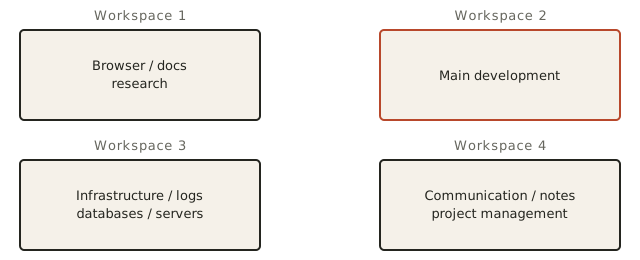
You can customize this later.
For training, this gives each activity a predictable location.
10.4 — Workspace 1: Research
Use:
Super + 1for:
- documentation;
- issue trackers;
- API references;
- browser-based tools;
- external research.
This keeps browser research from constantly covering your code.
10.5 — Workspace 2: Development
Use:
Super + 2for the primary project workspace.
A typical layout:
Ghostty
└── Tmux
    ├── Editor
    ├── AI agent
    └── terminal/test shell
This becomes the core of the AI development workstation.
10.6 — Workspace 3: Infrastructure
Use:
Super + 3for:
- dev servers;
- Docker/LazyDocker if needed;
- database shells;
- logs;
- SSH;
- system monitoring;
- deployment tools.
Separating infrastructure from the coding workspace reduces noise.
10.7 — Workspace 4: Communication
Use:
Super + 4for:
- chat;
- issue discussions;
- notes;
- project planning;
- email.
This helps create a clean focus boundary.
10.8 — Fast Code ↔ Documentation Switching
A useful pattern:
Workspace 2
→ code

Workspace 1
→ docs
Then use:
Super + Ctrl + Tabto jump back to the former workspace.
This creates a fast:
code
↔
documentation
loop.
10.9 — Build the Project Control Center in Tmux
Inside the development workspace, Tmux becomes the control center.
A strong baseline:
┌──────────────────────┬──────────────────────┐
│                      │                      │
│       Editor         │       AI Agent       │
│                      │                      │
├──────────────────────┴──────────────────────┤
│     Tests / Git / Dev Server / Shell        │
└─────────────────────────────────────────────┘
Current Omarchy provides a helper specifically for this style:
tdl AGENTThe official current Omarchy terminal and shell-function documentation describes tdl as an editor + AI agent + terminal development layout.
10.10 — Start From the Project Directory
Before launching the layout:
cd ~/Projects/YOUR_PROJECTVerify:
pwdThen:
git statusThen:
mise ls --currentOnly then create/attach your development session.
This gives you three critical facts:
Where am I?
What Git state am I in?
What runtime environment is active?
10.11 — A Good Daily Start Sequence
A practical daily startup can be:
cd ~/Projects/YOUR_PROJECT
git status
git branch --show-current
mise ls --current
Then:
tor your preferred Tmux session workflow.
If starting a fresh layout:
tdl YOUR_AGENTThe exact shell helper behavior should always be verified with:
type t
type tdl
on the learner’s current Omarchy version.
10.12 — Why git status Comes Before AI
Suppose your working tree already contains:
3 files modified by youThen an agent modifies:
5 more filesNow:
git diffcontains mixed authorship and mixed intent.
That makes review harder.
Prefer:
clean working tree
        ↓
agent task
        ↓
agent diff
whenever practical.
10.13 — New Project Bootstrap
For a new project:
mkdir -p ~/Projects/my-project
cd ~/Projects/my-project
git init
Add a runtime:
mise use node@CURRENT_REQUIRED_VERSIONor another required runtime.
Create:
README.md
AGENTS.md
.gitignore
Then make an initial commit.
Conceptually:
project/
├── .git/
├── .gitignore
├── AGENTS.md
├── mise.toml
├── README.md
└── source/
This is a strong AI-native project foundation.
10.14 — Cloned Project Bootstrap
For an existing repository:
gh repo clone OWNER/REPOSITORY
cd REPOSITORY
Then inspect before executing setup.
Recommended order:
git statuslsbat README.mdif present.
Inspect:
bat AGENTS.mdif present.
Inspect:
bat mise.tomlif present.
Then:
mise installafter you have reviewed the configuration.
10.15 — Do Not Let the Agent Discover Basic Project Facts by Guessing
Before a coding session, the project should make important facts explicit.
Examples:
runtime versions
→ mise.toml

dependency manager
→ package metadata / lockfile

project instructions
→ AGENTS.md

purpose
→ README.md

validation
→ test/lint scripts
The goal is to reduce ambiguity.
10.16 — A Useful AGENTS.md Structure
Keep it practical.
Example:
## AGENTS.md

### Project

Describe the application and its purpose.

### Architecture

- `src/api` — API routes
- `src/services` — business logic
- `tests` — test suite

### Environment

Use the versions declared in `mise.toml`.

### Commands

Install dependencies:

npm install

Run tests:

npm test

Run lint:

npm run lint

### Rules

- Keep changes focused.
- Do not modify secrets.
- Do not commit or push unless explicitly requested.
- Run relevant tests after code changes.
- Explain any architectural change before making it.
This is useful to both humans and compatible agents.
10.17 — The Four AI Work Phases
A strong AI coding task can be divided into:
1. Analyze
2. Plan
3. Implement
4. Verify
Do not collapse all four phases automatically into one giant prompt.
Separating them gives you checkpoints.
10.18 — Phase 1: Analyze
Example:
Inspect the authentication flow.

Do not edit files.

Explain:
- entry points;
- important modules;
- current behavior;
- likely cause of the bug;
- files that would probably need to change.
Goal:
understand before editing10.19 — Phase 2: Plan
After reviewing the analysis:
Propose the smallest implementation plan.

For each step, list:
- file;
- change;
- risk;
- validation method.

Do not edit yet.
This is particularly useful for:
- architectural work;
- risky refactors;
- unfamiliar repositories.
For tiny tasks, a separate planning phase may be unnecessary.
10.20 — Phase 3: Implement
After you agree with the direction:
Implement the approved plan.

Keep the change focused.

Do not commit or push.

Run the relevant tests.
The agent should now have a constrained task.
10.21 — Phase 4: Verify
Verification belongs to both the agent and the developer.
Run:
git status
git diff
Then run:
- tests;
- lint;
- type checking;
- build;
- manual validation;
as relevant.
Do not treat an agent’s statement:
Tests pass.as proof without checking output when the task matters.
10.22 — The Core AI Development Loop
A reliable daily loop is:
understand task
        ↓
git status
        ↓
agent analysis
        ↓
implementation
        ↓
tests
        ↓
git diff
        ↓
review
        ↓
refine
        ↓
git add
        ↓
git diff --staged
        ↓
commit
        ↓
push
This is the central workflow of the workstation.
10.23 — Editor and Agent Should Have Different Jobs
A common mistake is duplicating the same work in both panes.
Use the editor for:
- precise inspection;
- manual edits;
- code navigation;
- human judgment.
Use the agent for:
- codebase mapping;
- repetitive implementation;
- multi-file changes;
- debugging hypotheses;
- test generation;
- review.
Use the terminal for:
- Git;
- tests;
- development server;
- diagnostics.
Clear roles reduce cognitive overhead.
10.24 — Ask the Agent to Explain Before Large Changes
For a one-line fix, this may be unnecessary.
For a large refactor:
Explain the proposed change first.
Do not edit until the plan is clear.
This gives you a chance to catch:
- wrong architecture assumptions;
- unnecessary scope;
- poor dependency choices;
- security risks.
10.25 — Keep Agent Tasks Small Enough to Review
Good task:
Add validation for expired refresh tokens.Risky task:
Redesign the authentication system, database schema, API, frontend, and tests.The larger the task, the harder:
git diffbecomes to review.
Small reviewable tasks are usually more reliable.
10.26 — Use the Terminal Pane for Independent Verification
Do not make the agent pane the only source of command execution.
Keep a separate terminal pane for your own:
git statusgit diffnpm testor equivalent.
This keeps independent verification easy.
10.27 — Run the Smallest Relevant Test First
If the task changes one component:
run component testbefore:
run full test suiteTypical pattern:
targeted test
↓
broader test
↓
build/lint if appropriate
This gives faster feedback.
10.28 — Let Project Configuration Define Validation
Avoid hard-coding universal commands such as:
npm testfor every project.
The correct command may be:
pnpm test
bun test
pytest
cargo test
go test ./...
mise run test
The project should tell you.
Sources include:
- README;
- AGENTS.md;
- package metadata;
mise.toml;- CI configuration.
10.29 — Mise Tasks Can Standardize Workflows
Current mise supports project tasks.
A project can define:
[tasks.test]
run = "npm test"

[tasks.lint]
run = "npm run lint"
Then everyone can use:
mise run testand:
mise run lintThis can make AI-agent instructions more portable.
Instead of:
Run npm test unless we're in some other package manager...you can say:
Run `mise run test`.10.30 — Git Diff Is the Ground Truth of File Changes
After an agent works:
git difftells you what actually changed.
The agent’s summary is useful.
The diff is authoritative.
Review for:
- unexpected files;
- deleted code;
- large formatting churn;
- security changes;
- dependency changes;
- config changes;
- generated files.
10.31 — Diff Watching
Current Omarchy provides:
tdsas a square Tmux development layout containing:
- editor;
- live diff watcher via
hunk diff --watch; - terminal;
- AI agent.
This is especially useful when you want to observe changes as the agent edits.
Current official Omarchy shell-function documentation describes this layout explicitly.
10.32 — When tds Is Useful
Good use cases:
AI makes multi-file changes
you want live visual feedback
you are reviewing iterative edits
Less useful:
tiny one-file changeDo not use a four-pane setup just because it looks advanced.
10.33 — Verify Helper Dependencies
If:
tdsopens a pane with:
command not founddo not blame Tmux immediately.
The current documented layout depends on:
hunk diff --watchCheck:
type hunkThen determine whether the missing tool should be installed through:
- Omarchy;
- mise;
- system package layer.
Use the installation-layer decision tree from Module 6.
10.34 — Branches for Normal AI Tasks
A reasonable feature workflow:
git switch -c feature/auth-refreshThen launch the agent.
This isolates the work from:
mainAfter implementation:
git diffreview and test.
Later merge or open a pull request as appropriate.
10.35 — Worktrees for Parallel AI Tasks
Current Omarchy provides worktree helpers:
ga [branch]and:
gdThe current official shell-function documentation says:
ga
→ create a new branch/worktree next to the current repo and enter it

gd
→ remove the current worktree and branch after confirmation
Parallel structure:
project/
→ main worktree

project-feature-a/
→ Agent A

project-feature-b/
→ Agent B
This is far safer than two agents editing one checkout.
10.36 — Parallelize Independent Tasks Only
Good parallel tasks:
Agent A
→ backend endpoint

Agent B
→ unrelated documentation

Agent C
→ independent test suite
Bad parallel tasks:
Agent A
→ refactor auth module

Agent B
→ fix bugs in same auth module
Shared files create merge and reasoning conflicts.
10.37 — Omarchy’s Swarm Layout
Current Omarchy provides:
tsl <count> <command>to create several Tmux panes running the same command.
The official documentation describes it as useful for AI-agent swarms.
Example:
tsl 4 con the current documented OpenCode alias setup.
This is an advanced tool.
10.38 — A Swarm Is Not a Workflow by Itself
Four agent panes do not solve coordination.
You still need:
- task decomposition;
- separate worktrees;
- clear ownership;
- integration strategy;
- review.
Without those, a swarm can simply create four times as much confusion.
10.39 — The Best Default Is One Agent
For most development tasks:
one developer
+
one agent
+
one branch
+
one reviewable diff
is an excellent default.
Use multiple agents only when there is a measurable reason.
10.40 — A Second Agent as Reviewer
One useful pattern does not require simultaneous editing.
Example:
Agent A
→ implement

Agent B
→ review the final diff
The reviewer does not need permission to edit.
Prompt:
Review the current Git diff.

Do not modify files.

Look for:
- correctness;
- regressions;
- security issues;
- missing tests;
- unnecessary complexity.

Prioritize concrete findings.
This can provide a useful second perspective.
10.41 — Do Not Use AI Review as a Substitute for Tests
An AI reviewer can miss bugs.
Tests can miss bugs too.
Use multiple signals:
tests
+
diff review
+
static tools
+
AI review
+
manual validation
depending on project risk.
10.42 — Model Strength vs Task Complexity
Not every task needs the strongest available model.
A useful conceptual strategy:
simple repetitive task
→ fast/cheap model

codebase navigation
→ capable general coding model

hard architecture/debugging
→ stronger reasoning model

final review
→ independent second pass
Exact model names change quickly.
Do not hard-code the course around one provider.
10.43 — Cost Awareness
Current Omarchy 4 includes an agents usage panel for supported providers.
Current official documentation says it can show information such as:
- subscription plan;
- session/weekly usage;
- prepaid balance where relevant;
- token usage by day;
- token usage by model.
Use this as feedback.
If a simple task uses an expensive model unnecessarily, adjust your workflow.
10.44 — Latency Matters Too
A slower, stronger model may be appropriate for architecture.
For:
rename this function in five placeswaiting a long time for maximal reasoning may be unnecessary.
Developer productivity is a balance of:
quality
latency
cost
reviewability
not just raw model strength.
10.45 — Browser Research vs Agent Research
Use the browser when:
- you want to personally inspect official docs;
- you need current product information;
- you want visual context;
- you need authoritative sources.
Use the coding agent when:
- it needs to relate external information to the codebase;
- it needs to search local files;
- it needs to propose code changes.
Do not let local coding convenience replace source verification when documentation accuracy matters.
10.46 — Prefer Official Documentation for Tool Behavior
This course itself follows:
current official Omarchy docs
→ current official Omarchy source
→ upstream official tool docs
Use the same approach while developing.
Example:
If a Hyprland option behaves differently than expected:
official current Hyprland docsare a better source than an old Reddit comment.
The agent can help interpret docs, but source quality still matters.
10.47 — AI-Assisted Debugging Workflow
When something fails:
reproduce
↓
collect error
↓
identify component
↓
ask agent to analyze evidence
↓
propose smallest fix
↓
apply
↓
retest
Avoid:
paste vague symptom
→ let agent change everything
10.48 — Example Debug Prompt
The test `auth refresh rejects expired token` is failing.

Do not edit yet.

Inspect:
- the failing test;
- implementation path;
- relevant types/config;
- recent Git diff.

Explain the likely root cause and propose the smallest fix.
Then review before implementation.
10.49 — AI-Assisted Omarchy Troubleshooting
The same workflow applies to the workstation.
Example:
My terminal shortcut launches but immediately exits.

Do not modify anything.

Inspect:
- current Omarchy version;
- default terminal;
- relevant Hyprland binding;
- terminal command;
- failed user services;
- relevant logs.

Explain the evidence and propose one next step.
This keeps troubleshooting evidence-driven.
10.50 — Current Omarchy Crash Diagnosis
Current Omarchy can watch systemd-coredump for process crashes and present a crash notification.
The current official AI documentation says the crash can be handed to the configured default agent together with Omarchy’s crash-diagnosis guidance.
This is a good example of:
system evidence
→ AI analysis
rather than:
AI guess
→ random fix
10.51 — Remote Development
Current Omarchy shell functions include remote-development helpers.
The current official shell-function documentation includes:
rsw [source] [destination]to watch and synchronize files via rsync.
It also includes:
fip
dip
lip
for SSH port forwarding.
These are more advanced, but they fit naturally into the AI-development workstation.
10.52 — rsw: Remote Sync Watching
Current official behavior:
rsw [source] [destination]starts a background watcher that syncs source changes to a destination using rsync.
Example from current documentation:
rsw ~/Work/app nyc-dev:Work/appThis can support a workflow where:
edit locally
→ files sync remotely
→ run workload on stronger/remote machine
10.53 — List and Stop Rsync Watchers
Current helpers:
lswlist active watchers.
dswstop active watchers.
Verify current functions with:
type rsw
type lsw
type dsw
before relying on exact implementation details.
10.54 — SSH Port Forwarding
Current Omarchy shell functions include:
fipfor forwarding remote ports to localhost.
Current official example describes forwarding a remote dev server such as:
remote:3000to:
localhost:3000This is especially useful when browser security features require a localhost secure context.
10.55 — Remote AI Workflow
A possible advanced architecture:
Local Omarchy workstation
├── editor
├── Git
├── coding agent
└── browser

        ↓ rsync / SSH

Remote development machine
├── larger compute
├── dev server
├── database
└── test workloads
Do not build this unless you need it.
Local development is simpler.
10.56 — Long-Running Remote Work and Tmux
Tmux works extremely well over SSH.
Conceptually:
Omarchy
↓
SSH
↓
remote host
↓
Tmux
↓
long-running task
If the network drops:
Tmux session continuesReconnect and reattach.
This is one reason Tmux remains valuable even with modern graphical terminals.
10.57 — AI and Long-Running Processes
Do not let an agent hide all long-running processes inside its own opaque session.
Prefer visible, controllable processes.
Example:
Terminal pane
→ dev server

Agent pane
→ implementation
You can then independently:
- stop;
- restart;
- inspect;
- read logs.
10.58 — Keep Development Servers Visible
Good:
npm run devin its own Tmux window/pane.
Why?
Because you can see:
- startup failures;
- request logs;
- rebuilds;
- crashes.
This gives both you and the agent better evidence.
10.59 — A Daily Development Routine
A practical routine:
Start
cd ~/Projects/YOUR_PROJECT
git status
git branch --show-current
mise ls --current
Open/attach Tmux.
Launch:
- editor;
- agent;
- terminal.
During Work
task
→ analyze
→ implement
→ test
→ diff
→ review
Before Commit
git status
git diff
Run relevant validation.
Then:
git add ...
git diff --staged
git commit -m "..."
End
git statusEnsure you know what remains uncommitted.
Push if appropriate.
Detach Tmux if you want processes/session state to remain.
10.60 — End-of-Day Git Check
Before leaving a project:
git statusYou want to know whether the repository is:
cleanor:
contains intentional unfinished workDo not discover tomorrow that you forgot which changes were yours.
10.61 — End-of-Day Tmux Decision
If you want the workspace preserved:
Prefix + ddetach.
If the project session is finished:
- stop dev servers;
- exit panes;
- end the session.
Persistence is useful, but abandoned sessions create clutter.
10.62 — Capture Decisions Outside the Agent Session
If an important architectural decision was made during AI conversation, put it somewhere durable.
Examples:
README
architecture doc
issue
ADR
AGENTS.md
commit message
Do not depend on:
"I think the agent session from Tuesday explained this."Agent session history is not the project’s source of truth.
10.63 — A Good Project Is Self-Describing
Aim for this:
clone repository
↓
read README / AGENTS.md
↓
mise install
↓
dependency install
↓
run documented validation
↓
start development
If a new developer or agent cannot determine how to work with the project, improve the project documentation.
10.64 — Reproducibility Helps Humans and Agents Equally
When project setup is explicit:
new laptop
new developer
CI environment
AI coding agent
remote workstation
all benefit.
This is why:
- Git;
- mise;
- instructions;
- tests;
are foundational, not optional ceremony.
10.65 — Avoid Hidden Workstation Magic
Bad workstation:
"It works because I installed something globally six months ago."Better workstation:
"This project declares its runtime and setup."The AI-native workstation should become less magical, not more magical.
10.66 — The Human Approval Boundary
Define which actions should normally require deliberate approval.
A sensible baseline:
read files
→ low risk

edit project files
→ review afterwards

run project tests
→ generally low risk

install dependencies
→ inspect package/project first

Git commit
→ deliberate

Git push
→ deliberate

system package changes
→ deliberate

sudo
→ high scrutiny

delete data
→ high scrutiny

production actions
→ explicit approval
The exact agent can enforce these differently.
The principle is stable.
10.67 — Do Not Confuse Automation With Autonomy
Automation:
repeat a defined taskAutonomy:
decide the task and execute broadlyFor development, automation is often easier to trust.
Example:
Run tests after each changeis clearer than:
Make the project better until you think it's done.10.68 — Practical Exercise: Build the Daily Workspace
Create:
Workspace 1
→ browser

Workspace 2
→ Tmux development layout

Workspace 3
→ second terminal / dev server
Inside the Tmux layout:
editor
AI
terminal
Practice switching:
Workspace 1 ↔ Workspace 2using:
Super + Ctrl + Tab10.69 — Practical Exercise: Bootstrap a Project
Create:
mkdir -p ~/Projects/ai-workflow-practice
cd ~/Projects/ai-workflow-practice
git init
Add a suitable runtime with mise.
Create:
README.md
AGENTS.md
.gitignore
Commit:
git add .
git diff --staged
git commit -m "chore: bootstrap development environment"
You now have a clean baseline.
10.70 — Practical Exercise: Agent Analysis → Implementation
Start:
git statusAsk your agent to inspect the project without changes.
Then ask it to implement one small task.
Afterwards:
git status
git diff
Run validation.
Commit only after reviewing.
10.71 — Practical Exercise: Separate Reviewer
After one small implementation, open a second agent session or use a different model/agent if available.
Prompt:
Review the current Git diff only.

Do not edit files.

Identify:
- bugs;
- regressions;
- security concerns;
- missing tests;
- unnecessary complexity.
Compare the review with your own assessment.
10.72 — Practical Exercise: Worktree Isolation
From a clean repository, inspect:
type gaIf the current helper matches the documented behavior, create a temporary feature worktree:
ga feature/agent-testVerify:
pwd
git branch --show-current
git worktree list
Use this worktree for a small isolated AI task.
When finished and safe to remove, follow the current documented/helper workflow.
Do not delete worktrees blindly.
10.73 — Practical Exercise: Live Diff Layout
From a test project:
type tds
type hunk
If dependencies are available:
tdsAsk the agent to make a small file change.
Observe the diff watcher.
This shows how Omarchy can make AI-generated changes visible while they happen.
10.74 — Practical Exercise: Daily Shutdown
Before ending:
git statusIdentify:
- committed work;
- uncommitted work;
- ignored/generated files.
Then decide:
detach Tmux
or
close the session
A professional workflow includes knowing the state you leave behind.
10.75 — Common AI Workflow Mistakes
Mistake 1 — Starting the Agent Before Checking the Repository
Always inspect:
pwd
git status
git branch --show-current
Mistake 2 — Asking AI to Implement Before Understanding the Task
For non-trivial work:
analyze firstMistake 3 — One Huge Prompt for a Huge Refactor
Large vague tasks create large unreviewable diffs.
Mistake 4 — Letting the Agent Own Testing
You should still be able to run and interpret the project’s validation.
Mistake 5 — Using the Strongest/Most Expensive Model for Every Tiny Task
Match model capability to task complexity.
Mistake 6 — Starting Multiple Agents Without Isolation
Use worktrees for independent parallel editing.
Mistake 7 — Assuming More Agents Means Faster Delivery
Coordination and merge costs can erase the advantage.
Mistake 8 — Hiding Everything Inside One Agent Session
Keep:
- editor;
- tests;
- Git;
- logs;
independently visible.
Mistake 9 — Relying on Agent Session History for Important Project Knowledge
Put durable knowledge in the repository.
Mistake 10 — Making the Workstation Dependent on One Agent Vendor
Keep the project, runtime, Git, editor, and terminal workflow agent-independent.
10.76 — Checkpoint
Before moving on, you should be able to answer yes to the following.
Workstation Layout
- I have a sensible workspace layout for research, development, infrastructure, and communication.
- I understand how Tmux fits inside a Hyprland workspace.
- I can build an editor + agent + terminal development layout.
Project Bootstrap
- I can create a new Git project.
- I can declare runtime requirements with mise.
- I can create useful README/AGENTS/.gitignore files.
- I understand how to bootstrap a cloned project safely.
AI Workflow
- I understand Analyze → Plan → Implement → Verify.
- I know when a separate planning phase is useful.
- I keep AI tasks small enough to review.
- I inspect
git diffafter changes. - I run independent validation.
Parallel Work
- I know when a normal branch is enough.
- I understand why worktrees are useful for parallel agents.
- I understand the purpose of
tdl,tds,tdlm, andtsl. - I know a swarm is not automatically a productive workflow.
Cost and Model Use
- I understand that model strength should match task complexity.
- I understand that latency and cost matter.
- I know Omarchy currently provides usage visibility for selected providers.
Reproducibility
- I understand that important setup belongs in the project.
- I avoid hidden global workstation dependencies.
- I capture important decisions in durable project documentation.
10.77 — What You Can Now Do
After completing Module 10, you can now:
- operate Omarchy as an integrated AI-development workstation;
- structure graphical and terminal workspaces;
- bootstrap projects reproducibly;
- create AI-readable project context;
- separate analysis from implementation;
- keep AI changes reviewable through Git;
- run tests independently;
- use live diff watching;
- use branches and worktrees appropriately;
- parallelize AI work only when tasks justify it;
- make sensible model/cost trade-offs;
- preserve long-running work with Tmux;
- build local or remote development workflows;
- end each session with a known project state.
Most importantly:
You now have a repeatable AI-assisted software-development process rather than a collection of AI tricks.
Module 10 Summary
Workstation layout:
Workspace 1
→ browser / docs

Workspace 2
→ Tmux development environment

Workspace 3
→ infrastructure / servers / logs

Workspace 4
→ communication
Project baseline:
project/
├── .git/
├── .gitignore
├── AGENTS.md
├── mise.toml
├── README.md
└── source/
Daily start:
cd ~/Projects/YOUR_PROJECT
git status
git branch --show-current
mise ls --current
AI workflow:
Analyze
↓
Plan
↓
Implement
↓
Verify
Development loop:
git status
↓
agent
↓
test
↓
git diff
↓
review
↓
stage
↓
git diff --staged
↓
commit
Tmux helpers currently documented by Omarchy:
tdl
→ editor + AI + terminal

tds
→ editor + live diff + terminal + AI

tdlm
→ one dev layout per subdirectory

tsl
→ command/agent swarm
Parallel editing:
one task
→ branch

multiple independent tasks
→ separate worktrees
Remote helpers currently documented by Omarchy:
rsw
→ watched rsync

lsw
→ list watchers

dsw
→ stop watchers

fip / dip / lip
→ SSH port-forward helpers
And the most important lesson:
AI should accelerate a disciplined development loop, not replace it.