Module 14: Plugins, Hooks, and Automation on Omarchy
In this module — 60 sections
- What You Will Learn
- 14.1 — Autostart vs Hooks vs Plugins
- 14.2 — A Simple Decision Tree
- 14.3 — Current Hook Location
- 14.4 — Current Official Hook Events
- 14.5 — Event Arguments
- 14.6 — Inspect Existing Hook Samples
- 14.7 — Installing a Hook
- 14.8 — Hook Script Basics
- 14.9 — Make Hooks Fail Gracefully
- 14.10 — Avoid Interactive Commands in Hooks
- 14.11 — Avoid sudo in Automatic Hooks
- 14.12 — Log Useful Hook Output
- 14.13 — Do Not Create Noisy Hooks
- 14.14 — Good Hook Use Cases
- 14.15 — Poor Hook Use Cases
- 14.16 — Practical Hook Example: Post-Boot Log
- 14.17 — Test Hook Logic Before Installing
- 14.18 — Theme Hook Example
- 14.19 — Font Hook Example
- 14.20 — Hooks and Git
- 14.21 — Omarchy Shell Plugins
- 14.22 — Built-In vs Third-Party Plugin Locations
- 14.23 — List Plugins
- 14.24 — Plugin IDs
- 14.25 — Current Plugin Kinds
- 14.26 — Plugin Manifest
- 14.27 — Enable and Disable Plugins
- 14.28 — Plugin State Lives in shell.json
- 14.29 — Third-Party Plugins Run Code
- 14.30 — Plugin Security Model
- 14.31 — Review Before Enabling
- 14.32 — Add a Plugin from Git
- 14.33 — Where Third-Party Plugins Are Installed
- 14.34 — Plugin Updates
- 14.35 — Remove a Plugin
- 14.36 — Clone a Built-In Plugin Before Modifying It
- 14.37 — Edit the Clone
- 14.38 — If the Clone Breaks
- 14.39 — Validate a Plugin
- 14.40 — Plugin Development Language
- 14.41 — Hot Reload
- 14.42 — Full Bar Plugins
- 14.43 — Bar Widgets
- 14.44 — Plugins vs Hooks
- 14.45 — Plugins vs Autostart
- 14.46 — Practical Exercise: List Current Plugins
- 14.47 — Practical Exercise: Use the Plugin Menu
- 14.48 — Practical Exercise: Toggle a Non-Essential Built-In Plugin
- 14.49 — Practical Exercise: Inspect shell.json
- 14.50 — Practical Exercise: Harmless Post-Boot Hook
- 14.51 — Practical Exercise: Theme Event Hook
- 14.52 — Practical Exercise: Inspect a Plugin Before Enabling
- 14.53 — Practical Exercise: Clone a Built-In Plugin
- 14.54 — Practical Exercise: Validate a Local Plugin Folder
- 14.55 — Common Hook Mistakes
- 14.56 — Common Plugin Mistakes
- 14.57 — Checkpoint
- 14.58 — What You Can Now Do
- Module 14 Summary
About This Module
You can now customize:
- Hyprland;
- keybindings;
- themes;
- fonts;
- backgrounds.
The next step is making Omarchy react to events and extend itself.
Current Omarchy 4 / Quattro provides two major extension mechanisms:
Hooks
→ run your scripts when specific Omarchy events occur

Shell plugins
→ extend or replace parts of the Omarchy desktop shell
These solve different problems.
A hook is ideal for:
"When X happens, run this script."A shell plugin is ideal for:
"Add or replace an interactive piece of the desktop."Examples:
post-update hook
→ notify me or run a health check

theme-set hook
→ update another application's theme

bar-widget plugin
→ add a custom widget to the top bar

panel plugin
→ add a custom floating panel

service plugin
→ run a headless shell service
This module is where your workstation begins to become programmable.
The goal is not to turn you into an Omarchy Shell/QML developer.
The goal is:
Understand the extension model, automate simple events safely, install plugins carefully, and know where the security boundaries are.
What You Will Learn
By the end of Module 14, you will understand:
- the difference between autostart, hooks, and plugins;
- where Omarchy hooks live;
- which current hook events Omarchy exposes;
- how hook scripts receive event arguments;
- how to install a hook;
- how to make a hook safe and non-disruptive;
- how the Omarchy Shell plugin architecture works at a high level;
- where built-in and third-party plugins live;
- how to list plugins;
- how to enable and disable plugins;
- how to add a plugin from Git;
- how plugin updates work;
- how to remove plugins;
- how to clone a built-in plugin before modifying it;
- what plugin manifests contain;
- the current plugin kinds;
- how to validate a plugin;
- how plugin state is stored in
shell.json; - why third-party plugins are security-sensitive;
- how to build a harmless automation exercise.
14.1 — Autostart vs Hooks vs Plugins
These three mechanisms are related but distinct.
Autostart
Use when:
Start this process every graphical login.
Current location:
~/.config/hypr/autostart.luaExample:
o.launch_on_start("my-service")Hooks
Use when:
When this Omarchy event happens, run my script.
Examples:
after boot
after update
after theme change
low battery
Plugins
Use when:
Extend or replace part of the Omarchy Shell.
Examples:
top-bar widget
panel
overlay
menu
service
full replacement bar
14.2 — A Simple Decision Tree
Ask:
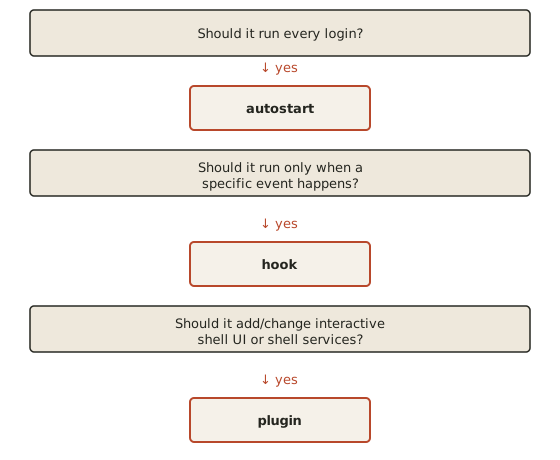
This distinction keeps configuration understandable.
14.3 — Current Hook Location
Current official Omarchy documentation stores user hooks under:
~/.config/omarchy/hooks/<event>.d/Each event has its own directory.
Every executable file inside that directory runs when the event fires.
Conceptually:
~/.config/omarchy/hooks/
├── post-boot.d/
│   ├── 10-notify
│   └── 20-health-check
│
├── post-update.d/
│   └── 10-project-check
│
└── theme-set.d/
    └── 10-sync-my-app-theme
This directory-style model allows multiple independent automations to react to the same event.
14.4 — Current Official Hook Events
Current Quattro documentation lists these hook events:
post-boot
post-update
pre-refresh-pacman
theme-set
font-set
battery-low
Their current meanings are:
post-boot
→ after the desktop has started

post-update
→ during `omarchy update`, after packages and migrations

pre-refresh-pacman
→ before `omarchy refresh pacman` re-syncs package configuration

theme-set
→ after a theme change

font-set
→ after a font change

battery-low
→ when battery level becomes low
The exact set can evolve with Omarchy.
Inspect the current hook directories and documentation on your installed version.
14.5 — Event Arguments
Current official Omarchy documentation states that some hooks receive an argument.
Current examples:
theme-set
→ theme name in $1

font-set
→ font name in $1

battery-low
→ battery percentage in $1
That means a script can react differently depending on the event value.
Example:
#!/usr/bin/env bash

theme="$1"

printf 'Theme changed to: %s\n' "$theme"
14.6 — Inspect Existing Hook Samples
Current Omarchy hook directories include .sample files showing the intended structure.
Inspect:
find ~/.config/omarchy/hooks -maxdepth 2 -type for:
fd -H . ~/.config/omarchy/hooksRead a sample:
bat ~/.config/omarchy/hooks/post-boot.d/*.sampleUse current shipped examples rather than copying an old internet snippet.
14.7 — Installing a Hook
Current official syntax:
omarchy hook install EVENT SCRIPTExample:
omarchy hook install post-boot ~/my-hookCurrent documentation says this copies the script into the correct hook location and makes it executable.
This is cleaner than manually guessing permissions and paths.
14.8 — Hook Script Basics
A hook is just an executable script.
Example:
#!/usr/bin/env bash

printf 'Omarchy boot hook ran at %s\n' "$(date)" >> "$HOME/.local/state/omarchy-hook.log"
Important parts:
shebang
→ tells Linux how to run the script

absolute/safe paths
→ reduce environment assumptions

logging
→ makes troubleshooting possible
14.9 — Make Hooks Fail Gracefully
A hook should not turn a minor automation failure into a broken workstation experience.
Prefer:
#!/usr/bin/env bash

if ! some-optional-command; then
  printf 'optional command failed\n' >> "$HOME/.local/state/my-hook.log"
  exit 0
fi
for non-critical automations.
The principle:
A convenience hook should usually fail quietly and log clearly.
14.10 — Avoid Interactive Commands in Hooks
Bad hook:
read -p "Continue?"Why?
Hooks may run without a terminal attached.
Interactive prompts can hang or behave unexpectedly.
Prefer non-interactive commands.
14.11 — Avoid sudo in Automatic Hooks
A hook that fires automatically should not casually need root privileges.
Problems include:
- password prompts;
- hanging execution;
- unexpected privilege escalation;
- difficult debugging.
If automation genuinely requires privileged work, design it deliberately.
Do not sneak sudo into a convenience script.
14.12 — Log Useful Hook Output
A good pattern:
state_dir="$HOME/.local/state/my-hook"
mkdir -p "$state_dir"

{
  printf '=== %s ===\n' "$(date --iso-8601=seconds)"
  some-command
} >> "$state_dir/run.log" 2>&1
Now if something behaves strangely, you have evidence.
14.13 — Do Not Create Noisy Hooks
Bad:
post-boot
→ 25 notifications

post-update
→ 12 browser tabs

theme-set
→ rebuild half the workstation
Automation should reduce friction.
If it becomes more annoying than the manual action, remove it.
14.14 — Good Hook Use Cases
Useful examples:
post-boot
→ start a harmless user helper
→ run a quick environment sanity check
→ write a startup log

post-update
→ record current Omarchy version
→ run a non-destructive health check

theme-set
→ update an unsupported app theme

font-set
→ regenerate external editor config

battery-low
→ trigger an extra personal warning
14.15 — Poor Hook Use Cases
Avoid using hooks to:
- rewrite system files;
- reinstall large toolchains every boot;
- run destructive cleanup automatically;
- push Git repositories automatically;
- modify bootloader configuration;
- delete caches blindly;
- perform irreversible tasks without review.
The more dangerous the action, the less appropriate it is for implicit automation.
14.16 — Practical Hook Example: Post-Boot Log
Create:
mkdir -p ~/Projects/omarchy-hook-practice
nvim ~/Projects/omarchy-hook-practice/post-boot-log
Contents:
#!/usr/bin/env bash

state_dir="$HOME/.local/state/stevinator"
mkdir -p "$state_dir"

printf 'Omarchy desktop started: %s\n' "$(date --iso-8601=seconds)" \
  >> "$state_dir/post-boot.log"
Save.
Install:
omarchy hook install post-boot ~/Projects/omarchy-hook-practice/post-boot-logThis is intentionally harmless.
14.17 — Test Hook Logic Before Installing
Before installing:
bash ~/Projects/omarchy-hook-practice/post-boot-logThen:
bat ~/.local/state/stevinator/post-boot.logOnly after it works manually should you connect it to an automatic event.
This is the same principle we use for keybindings:
test action first
→ wire automation second
14.18 — Theme Hook Example
A simple theme hook could log the chosen theme:
#!/usr/bin/env bash

theme="$1"

printf '%s %s\n' "$(date --iso-8601=seconds)" "$theme" \
  >> "$HOME/.local/state/theme-history.log"
When the theme changes, $1 contains the current theme name according to the current official hook contract.
14.19 — Font Hook Example
Similarly:
#!/usr/bin/env bash

font="$1"

printf '%s %s\n' "$(date --iso-8601=seconds)" "$font" \
  >> "$HOME/.local/state/font-history.log"
This is a good exercise because it demonstrates event arguments without changing the system.
14.20 — Hooks and Git
If you create useful personal hooks, treat them as source code.
Put the source versions in your dotfiles repository later.
Do not rely only on:
the copy currently installed under ~/.config/omarchy/hooksThe reproducible source should live somewhere version-controlled.
14.21 — Omarchy Shell Plugins
Current Omarchy 4’s desktop runs as a single long-lived Quickshell process:
omarchy-shellThe current official manual explains that much of what you see is implemented as plugins.
Examples include:
- the bar;
- drop-down panels;
- clipboard manager;
- emoji overlay;
- Omarchy menu;
- lock screen;
- polkit dialog;
- background services.
This means the shell itself is extensible.
14.22 — Built-In vs Third-Party Plugin Locations
Current official documentation defines:
Built-in plugins:
$OMARCHY_PATH/shell/plugins/
and user/third-party plugins:
~/.config/omarchy/plugins/Typically:
$OMARCHY_PATH
→ /usr/share/omarchy
Built-ins belong to Omarchy.
User plugins belong to you.
14.23 — List Plugins
Current official command:
omarchy plugin listThis prints discovered plugins with information such as:
- id;
- enabled state;
- first-party vs third-party;
- kinds;
- display name.
For machine-readable output:
omarchy plugin list --jsonUse this before changing plugin state.
14.24 — Plugin IDs
Current built-in plugin IDs use the reserved:
omarchy.namespace.
Examples from current docs include:
omarchy.clock
omarchy.network
omarchy.notifications
Third-party plugins cannot claim the reserved built-in namespace.
This avoids collisions.
14.25 — Current Plugin Kinds
Current Omarchy plugin manifests can declare one or more kinds.
The current official plugin documentation lists:
bar-widget
panel
overlay
menu
service
bar
Conceptually:
bar-widget
→ one component in the active bar

panel
→ floating window/panel

overlay
→ fullscreen overlay

menu
→ summonable menu surface

service
→ headless singleton

bar
→ complete bar replacement
14.26 — Plugin Manifest
A third-party plugin is currently a Git repository with:
manifest.jsonat its root.
A minimal conceptual manifest includes fields such as:
{
  "schemaVersion": 1,
  "id": "my.example.plugin",
  "name": "Example Plugin",
  "version": "1.0.0",
  "kinds": ["bar-widget"],
  "entryPoints": {
    "barWidget": "Widget.qml"
  }
}
Do not memorize the schema.
Use current official plugin documentation when creating one.
14.27 — Enable and Disable Plugins
Current official commands include:
omarchy plugin enable PLUGIN_IDand:
omarchy plugin disable PLUGIN_IDExamples:
omarchy plugin enable omarchy.tailscaleomarchy plugin disable omarchy.weatherYou can also use:
Super + Space
→ Setup
→ Plugins
for plugin management.
14.28 — Plugin State Lives in shell.json
Current official documentation states that enabled/disabled shell state is stored in:
~/.config/omarchy/shell.jsonThis file controls things such as:
- bar selection;
- bar position;
- widget layout;
- enabled third-party plugins;
- disabled built-in plugins;
- idle/screen timing.
You normally do not need to hand-edit it for simple plugin management because the CLI/menu can update it.
14.29 — Third-Party Plugins Run Code
This is the single most important plugin security fact.
Current official Omarchy documentation explicitly warns that plugins run as:
arbitrary, unsandboxed code inside the long-running shell process.
They have the same general user-level file/process access as the shell.
That means a plugin is not just a visual theme.
It is executable code.
14.30 — Plugin Security Model
Current Omarchy does apply capability-scoped interfaces to third-party plugins and protects some sensitive shell services.
But the official documentation still says:
plugin code runs with user-level accessand visual plugins share the QML object scene.
Therefore:
Only install plugin repositories you are willing to run as your user account.
14.31 — Review Before Enabling
Current plugin installation flow is deliberately cautious.
The official documentation states that adding a plugin:
- warns you that it runs code;
- shows the repository URL;
- asks for confirmation;
- clones and validates the manifest;
- does not run an install hook;
- does not ask for sudo.
Without explicit enablement, you can inspect the code before activating it.
This is the correct workflow.
14.32 — Add a Plugin from Git
Current official syntax:
omarchy plugin add REPOSITORY_URLExample form:
omarchy plugin add https://github.com/example/omarchy-weather.gitCurrent documentation also supports:
--enablewhen you deliberately want to enable it during installation.
For learning:
Add first, inspect second, enable third.
14.33 — Where Third-Party Plugins Are Installed
Current official location:
~/.config/omarchy/plugins/<id>/Inspect after adding:
ls ~/.config/omarchy/pluginsThen:
bat ~/.config/omarchy/plugins/PLUGIN_ID/manifest.jsonReview the code before enabling.
14.34 — Plugin Updates
Current official command:
omarchy plugin update PLUGIN_IDor all Git-managed plugins:
omarchy plugin updateCurrent documentation states that updates:
- fetch the current repository;
- show the diff;
- use a fast-forward update;
- refuse problematic local-change situations;
- validate the new revision;
- roll back if validation fails.
The important habit:
Read the diff before accepting code updates to a plugin.
14.35 — Remove a Plugin
Current command:
omarchy plugin remove PLUGIN_IDCurrent official documentation says removal first disables the plugin.
Git-managed plugin checkouts can then be removed.
For handmade plugin folders, current behavior is more cautious and can move them to a timestamped backup instead of blindly deleting them.
14.36 — Clone a Built-In Plugin Before Modifying It
Do not edit built-in plugin files under:
$OMARCHY_PATHCurrent official workflow:
omarchy plugin clone omarchy.clockThis copies the built-in into:
~/.config/omarchy/plugins/<username>.clock/renames it as your copy, enables it, and switches shell behavior to the clone.
This is the plugin equivalent of:
Override Omarchy; do not overwrite Omarchy.
14.37 — Edit the Clone
Current official command can also use:
omarchy plugin clone omarchy.clock --editto open the cloned plugin in your configured editor.
Changes under:
~/.config/omarchy/plugins/are currently hot-reloaded by the shell.
That creates a quick edit/observe workflow.
14.38 — If the Clone Breaks
Current official behavior allows you to remove the clone:
omarchy plugin remove YOUR_IDand return to the built-in plugin.
This makes experimentation significantly safer than editing package-owned shell code.
14.39 — Validate a Plugin
Current official command:
omarchy plugin validate ./my-pluginThe current validator checks areas including:
- schema version;
- required fields;
- reserved IDs;
- valid/safe entry-point paths;
- entry-point existence;
- required entry points for declared kinds;
- symlink restrictions.
Run validation before sharing or enabling a plugin you are developing.
14.40 — Plugin Development Language
Current Omarchy Shell plugins use:
QMLinside the Quickshell-based desktop.
A typical plugin therefore includes:
manifest.json
+
one or more .qml files
You do not need QML knowledge for normal Omarchy use.
Plugin development is an advanced track.
14.41 — Hot Reload
Current official documentation states that saving files anywhere under:
~/.config/omarchy/plugins/automatically reloads plugin code.
That makes local plugin development interactive.
However:
A fast reload loop makes it easier to experiment, not safer to run untrusted code.
Security rules still apply.
14.42 — Full Bar Plugins
A plugin of kind:
barreplaces the entire active Omarchy bar.
Current official documentation says there is always exactly one active bar.
Enabling a full-bar plugin therefore replaces the current bar rather than adding another one.
This is a much bigger change than enabling one bar widget.
14.43 — Bar Widgets
A:
bar-widgetis a component placed into the active bar.
Current manifests may define a default section such as:
left
center
right
and whether multiple instances are allowed.
Current Omarchy also exposes dedicated bar-management commands, but those belong more to shell customization than this module’s core goal.
14.44 — Plugins vs Hooks
A plugin should not be your default solution for simple automation.
Example:
After update, write version to a logUse a hook.
Do not create a QML service plugin.
Conversely:
Add a new live top-bar widgetUse a plugin.
Do not continuously rebuild it through a shell hook.
Use the simplest correct mechanism.
14.45 — Plugins vs Autostart
If you merely need:
start syncthing wrapper every loginuse autostart or an appropriate systemd user service.
Do not make a shell plugin just to launch a background process unless it genuinely needs shell/plugin integration.
14.46 — Practical Exercise: List Current Plugins
Run:
omarchy plugin listIdentify:
- one built-in bar widget;
- one panel;
- one service;
- one disabled plugin if present.
Then:
omarchy plugin list --json | headto see that structured output is available.
14.47 — Practical Exercise: Use the Plugin Menu
Open:
Super + Space
→ Setup
→ Plugins
Inspect the available actions.
Current documentation includes:
Enable
Disable
Add
Clone
Remove
Do not change anything yet.
14.48 — Practical Exercise: Toggle a Non-Essential Built-In Plugin
Choose a harmless plugin that is not essential to your workflow.
Disable:
omarchy plugin disable PLUGIN_IDObserve the shell.
Re-enable:
omarchy plugin enable PLUGIN_IDThe goal is to understand the plugin state model.
Do not disable critical lock/authentication functionality merely for practice.
14.49 — Practical Exercise: Inspect shell.json
Run:
bat ~/.config/omarchy/shell.jsonObserve current sections such as:
bar
plugins
disabledPlugins
idle
Exact contents depend on your customizations.
Do not rewrite this file unless you understand the schema.
14.50 — Practical Exercise: Harmless Post-Boot Hook
Create and manually test the post-boot logging hook from earlier.
Install it:
omarchy hook install post-boot ~/Projects/omarchy-hook-practice/post-boot-logAfter the next session startup, inspect:
bat ~/.local/state/stevinator/post-boot.logThis completes the module’s core automation exercise.
14.51 — Practical Exercise: Theme Event Hook
Create a harmless script that records $1.
Install it for:
theme-setChange theme once.
Inspect the resulting log.
Then return to your preferred theme.
This demonstrates event arguments safely.
14.52 — Practical Exercise: Inspect a Plugin Before Enabling
If you choose to install a third-party plugin for practice:
- use a repository you intentionally selected;
- add it without forcing automatic enablement;
- inspect:
manifest.json;- QML files;
- shell/process calls;
- validate it;
- only enable if you are comfortable running it.
Do not install arbitrary plugins merely to complete the exercise.
Inspection without installation is valid.
14.53 — Practical Exercise: Clone a Built-In Plugin
Optional advanced exercise.
Run:
omarchy plugin clone omarchy.clock --editInspect:
manifest.json
QML files
Make no changes initially.
Observe where the clone was created.
Then remove your clone if you do not want to maintain it.
This demonstrates the correct way to customize a built-in plugin.
14.54 — Practical Exercise: Validate a Local Plugin Folder
If you cloned or created one:
omarchy plugin validate ~/.config/omarchy/plugins/YOUR_PLUGINRead validation output.
Do not interpret successful schema validation as a security audit.
It only means the plugin satisfies structural rules.
14.55 — Common Hook Mistakes
Mistake 1 — Putting an Event Script in Autostart
If it should only run after updates, use:
post-updatenot login autostart.
Mistake 2 — Writing Interactive Hooks
Hooks should normally be non-interactive.
Mistake 3 — Using sudo in Automatic Hooks
Avoid unattended privilege escalation.
Mistake 4 — Failing Silently With No Log
If a hook matters, make troubleshooting possible.
Mistake 5 — Doing Destructive Cleanup Automatically
Automation should not casually remove data.
14.56 — Common Plugin Mistakes
Mistake 1 — Treating Plugins Like Themes
Plugins execute code.
They are not merely visual assets.
Mistake 2 — Editing Built-In Plugin Files
Clone first:
omarchy plugin clone ...Mistake 3 — Enabling an Unknown Plugin Before Reading It
Review first.
Mistake 4 — Assuming Plugin Validation Means “Safe”
Validation checks structure, not intent.
Mistake 5 — Auto-Updating Plugins Without Reading Diffs
Current Omarchy exposes the diff for a reason.
Mistake 6 — Building a Plugin for a Problem a Hook Can Solve
Use the simplest extension mechanism.
Mistake 7 — Using a Plugin for a Normal Background Service
Use autostart/systemd where appropriate.
Mistake 8 — Forgetting That Plugins Share User-Level Access
A malicious plugin can potentially access files your user account can access.
14.57 — Checkpoint
Before moving on, you should be able to answer yes to the following.
Architecture
- I understand the difference between autostart, hooks, and plugins.
- I know when each mechanism is appropriate.
- I understand that Omarchy Shell runs as a long-lived Quickshell process.
Hooks
- I know where hooks live.
- I know the currently documented hook events.
- I understand event arguments such as
$1. - I can install a hook with
omarchy hook install. - I know how to make a hook non-interactive and safe.
- I know how to log hook output.
Plugins
- I can list current plugins.
- I know where built-in plugins live.
- I know where user plugins live.
- I can enable and disable a plugin.
- I know how to add a plugin from Git.
- I understand plugin updates and removal.
- I know how to clone a built-in before modifying it.
- I understand the current plugin kinds.
- I can validate a plugin.
Security
- I understand that third-party plugins execute unsandboxed user-level code.
- I know to review plugin code before enabling it.
- I understand that validation is not a security review.
- I know not to grant hooks/plugins unnecessary
sudobehavior.
14.58 — What You Can Now Do
After completing Module 14, you can now:
- automate Omarchy events safely;
- create post-boot and post-update workflows;
- react to theme/font/battery events;
- keep hook behavior logged and debuggable;
- inspect the Omarchy Shell plugin system;
- enable and disable shell components;
- install and update third-party plugins carefully;
- clone built-in plugins before customizing them;
- distinguish UI extensions from simple automation;
- reason about plugin security;
- build a workstation that reacts to your workflow without becoming fragile.
Most importantly:
You can now extend Omarchy without editing its source and automate it without hiding dangerous behavior.
Module 14 Summary
Use:
autostart
→ every session

hook
→ event-driven script

plugin
→ shell/UI/service extension
Hook location:
~/.config/omarchy/hooks/<event>.d/Current documented events:
post-boot
post-update
pre-refresh-pacman
theme-set
font-set
battery-low
Install hook:
omarchy hook install post-boot ~/my-hookPlugin discovery:
omarchy plugin listPlugin control:
omarchy plugin enable PLUGIN_ID
omarchy plugin disable PLUGIN_ID
Install:
omarchy plugin add REPOSITORY_URLUpdate:
omarchy plugin update PLUGIN_IDRemove:
omarchy plugin remove PLUGIN_IDClone built-in:
omarchy plugin clone omarchy.clock --editValidate:
omarchy plugin validate ./my-pluginPlugin kinds:
bar-widget
panel
overlay
menu
service
bar
User plugins:
~/.config/omarchy/plugins/Shell state:
~/.config/omarchy/shell.jsonAnd the most important security rule:
A third-party Omarchy plugin is executable code running as your user. Review it like code, not like a wallpaper.