Module 19: Restart, Repair, and Recovery on Omarchy
In this module — 65 sections
- What You Will Learn
- 19.1 — The Recovery Hierarchy
- 19.2 — Restart Is Not Reinstall
- 19.3 — First Principle: Preserve Evidence
- 19.4 — Why Evidence Comes Before Restart
- 19.5 — Discover Current Restart Helpers
- 19.6 — Why Restart Helpers Are Valuable
- 19.7 — Hardware Restart Menu
- 19.8 — Audio Restart
- 19.9 — Bluetooth Restart
- 19.10 — Wi-Fi Restart
- 19.11 — Trackpad Restart
- 19.12 — Omarchy Shell Restart
- 19.13 — When to Restart the Shell
- 19.14 — Shell IPC Check
- 19.15 — Shell Plugin Problems
- 19.16 — XCompose Restart
- 19.17 — Tmux Restart
- 19.18 — Real Course Example: Stale Tmux Working Directory
- 19.19 — Terminal Restart
- 19.20 — Application Restart
- 19.21 — Configuration Repair: Edit First
- 19.22 — Git Makes Config Repair Easier
- 19.23 — omarchy refresh config
- 19.24 — When to Use Targeted Config Refresh
- 19.25 — Compare Before Refreshing
- 19.26 — omarchy refresh hyprland
- 19.27 — Never Use refresh hyprland for One Shortcut
- 19.28 — omarchy reinstall configs
- 19.29 — omarchy reinstall
- 19.30 — Broad Recovery Changes More Than the Symptom
- 19.31 — Snapshot Rollback
- 19.32 — Snapshot Does Not Repair /home
- 19.33 — System Problem vs User Config Problem
- 19.34 — omarchy-debug
- 19.35 — Why Debug Bundles Matter
- 19.36 — Do Not Publish Secrets in Debug Output Blindly
- 19.37 — TTY Recovery
- 19.38 — Why TTY Is Powerful
- 19.39 — Password Lockout Recovery
- 19.40 — Do Not Confuse Lockout With Wrong Password
- 19.41 — Systemd Failed Services
- 19.42 — Logs Need Interpretation
- 19.43 — Coredumps
- 19.44 — AI-Assisted Repair
- 19.45 — AI Should Not Immediately “Fix Everything”
- 19.46 — When a Reboot Is Appropriate
- 19.47 — When a Session Restart Is Enough
- 19.48 — When Snapshot Rollback Is Appropriate
- 19.49 — When Reinstall Is Appropriate
- 19.50 — The Recovery Decision Tree
- 19.51 — Practical Exercise: Discover Restart Commands
- 19.52 — Practical Exercise: Shell Health
- 19.53 — Practical Exercise: Restart the Shell
- 19.54 — Practical Exercise: XCompose Restart
- 19.55 — Practical Exercise: Failed Services
- 19.56 — Practical Exercise: Config Error Recovery
- 19.57 — Practical Exercise: Inspect Refresh Commands
- 19.58 — Practical Exercise: Review Snapshot Recovery Path
- 19.59 — Practical Exercise: TTY Recovery
- 19.60 — Build Your Recovery Cheat Sheet
- 19.61 — Common Recovery Mistakes
- 19.62 — Checkpoint
- 19.63 — What You Can Now Do
- Module 19 Summary
About This Module
A stable workstation is not one that never breaks.
It is one where you know:
what broke
→ what layer it belongs to
→ what the smallest repair is
→ how far to escalate
This module teaches that escalation ladder.
Current Omarchy 4 / Quattro deliberately provides component-level restart helpers and targeted recovery tools so that a single problem does not automatically become:
rebootor worse:
reinstall the whole systemExamples:
audio disappears
→ restart audio

Bluetooth headset stops reconnecting
→ restart Bluetooth

trackpad dies after suspend
→ restart trackpad

Omarchy Shell stops responding
→ restart shell

XCompose changes do not appear
→ restart XCompose

one config is broken
→ repair/refresh that config

an update breaks the system
→ boot a snapshot

everything is severely corrupted
→ broad reinstall as a last resort
The goal of this module is:
Use the smallest recovery action that matches the broken layer.
What You Will Learn
By the end of Module 19, you will understand:
- the difference between restart, refresh, reinstall, snapshot rollback, and reboot;
- how to discover the current Omarchy restart helpers;
- how to restart the Omarchy Shell;
- how to restart hardware subsystems;
- how to restart Tmux and terminal-related components carefully;
- how to refresh specific user configuration;
- how Omarchy backs up a config before replacing it;
- why
omarchy refresh hyprlandis broad and destructive to personal Hyprland config; - why
omarchy reinstall configsis a last-resort configuration reset; - how
omarchy-debugfits into escalation; - how to recover from password lockout from a TTY;
- when snapshots are appropriate;
- when a reboot is appropriate;
- when a reinstall is appropriate;
- how to preserve evidence before changing the system;
- how to build a disciplined recovery ladder.
19.1 — The Recovery Hierarchy
Use this mental model:
1. inspect
2. retry/reselect
3. restart the affected component
4. repair the specific config
5. refresh the specific config
6. restart the session / reboot
7. snapshot rollback
8. broad config/package reinstall
The order matters.
Do not jump from:
small symptomto:
large destructive actionwithout evidence.
19.2 — Restart Is Not Reinstall
These words mean different things.
Restart
stop/start a process or subsystemState/config remains.
Refresh
replace one or more user config files with current shipped defaultsUser customizations may be overwritten, usually with backup behavior depending on the command.
Reinstall
restore broad default package/config statePotentially destructive to customization.
Snapshot Rollback
restore root filesystem to a previous system stateDoes not restore /home.
19.3 — First Principle: Preserve Evidence
Before repairing something, collect enough evidence to know what happened.
Examples:
git diffhyprctl configerrorssystemctl --failedsystemctl --user --failedjournalctl --user -bjournalctl -bYou do not need to run all of these every time.
Use the ones appropriate to the symptom.
19.4 — Why Evidence Comes Before Restart
A restart may make the symptom disappear.
That is good operationally.
But if the issue keeps returning, you still need to know:
what failed?For recurring problems:
capture logs/state first
→ restart second
For a one-off harmless glitch:
restart immediatelymay be perfectly reasonable.
19.5 — Discover Current Restart Helpers
Current Omarchy uses restart helpers extensively.
Start with:
omarchy restart --helpand:
omarchy commands --all | grep -i restartCurrent Omarchy generations include restart helpers for categories such as:
app
audio
bluetooth
btop
helix
herdr
hyprctl
hyprsunset
opencode
shell
terminal
tmux
trackpad
wifi
xcompose
The exact list changes.
Treat your installed CLI as the current source of truth.
19.6 — Why Restart Helpers Are Valuable
Without helpers, you would need to know which low-level process/service controls each component.
Example:
audio
→ PipeWire?
→ WirePlumber?
→ user services?
→ stream restoration?
Omarchy can wrap the intended recovery flow.
That keeps the public workflow stable even if implementation details change.
19.7 — Hardware Restart Menu
Current official troubleshooting documentation says common hardware recovery is available under:
Super + Space
→ Update
→ Hardware
Current documented hardware reloads include:
Wi-Fi
Bluetooth
Audio
Trackpad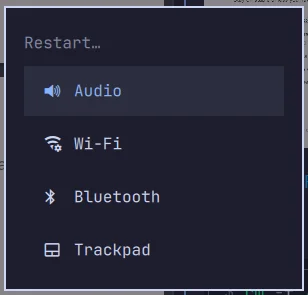
This is the beginner-friendly recovery path.
19.8 — Audio Restart
If audio disappears:
1. check output selection
2. check mute/volume
3. restart audio
4. retry playback
Current official troubleshooting guidance explicitly recommends restarting audio before rebooting.
Use the current menu or CLI.
Discover:
omarchy restart --helpThen use the current audio restart command.
19.9 — Bluetooth Restart
Typical symptom:
headset worked five minutes ago
now refuses to reconnect
Recovery:
verify Bluetooth power
↓
disconnect/reconnect
↓
restart Bluetooth
↓
retry
Forget/re-pair only if needed.
19.10 — Wi-Fi Restart
If Wi-Fi suddenly stops working:
check current network
↓
check signal/state
↓
restart Wi-Fi/network subsystem
↓
reconnect
Do not immediately start editing NetworkManager profiles or kernel modules.
19.11 — Trackpad Restart
Current official troubleshooting docs explicitly mention:
trackpad died after suspendas a case where a subsystem restart often fixes the issue.
This is particularly useful on laptops.
19.12 — Omarchy Shell Restart
Current Omarchy Shell architecture states that the desktop shell runs as one long-lived Quickshell process.
It hosts:
- bar;
- panels;
- overlays;
- menus;
- services;
- plugins.
Current official shell architecture explicitly says to restart it with:
omarchy-restart-shellThe routed CLI may also expose:
omarchy restart shelldepending on current version.
Verify with:
omarchy restart --help19.13 — When to Restart the Shell
Useful symptoms:
bar disappeared
panel will not open
plugin state is stale
shell UI is not responding
A shell restart is much smaller than:
restart Hyprland sessionor:
reboot19.14 — Shell IPC Check
Current Omarchy Shell exposes IPC.
A basic current check is:
omarchy-shell shell pingIf the shell is healthy, IPC should respond.
If it reports:
omarchy-shell is not runningor:
omarchy-shell is not respondinga shell restart is appropriate.
19.15 — Shell Plugin Problems
If the shell became unstable immediately after enabling a third-party plugin:
1. disable/remove the plugin if possible
2. restart shell
3. verify
Do not first reinstall the entire shell/system.
Plugin problems should be repaired at the plugin layer.
19.16 — XCompose Restart
Current official dotfiles docs say changes to:
~/.XComposerequire:
omarchy-restart-xcomposeto be picked up.
This is a good example of a targeted restart.
You changed one input-related user configuration.
Restart the one affected component.
19.17 — Tmux Restart
Tmux is persistent by design.
That means configuration/process state can remain alive longer than your terminal window.
If you changed Tmux configuration and the old session still behaves as before:
existing server/session may still have old stateUse current Omarchy Tmux restart helpers only when you intentionally want to restart that persistent environment.
Warning
Restarting Tmux may terminate sessions/processes depending on current helper behavior.
Inspect:
omarchy restart --helpand:
type omarchy-restart-tmuxbefore using it during important work.
19.18 — Real Course Example: Stale Tmux Working Directory
During the real workstation setup, a persistent Tmux session kept the previous pane working directory.
The new terminal had:
~/Projects/projectinatorbut the existing Tmux session retained older pane state.
The solution was not:
reboot LinuxIt was to restart/recreate the Tmux session.
Persistent tools preserve state by design.
19.19 — Terminal Restart
A terminal restart helper can be useful when:
- terminal configuration changed;
- launch integration is stale;
- a terminal process/session needs a clean start.
But remember:
terminal
≠
shell
≠
Tmux
These are different layers.
A Ghostty problem should not automatically lead to restarting Tmux or the Omarchy Shell.
19.20 — Application Restart
Current Omarchy includes app-level restart helpers.
This is useful when one app is stuck while the rest of the system is healthy.
Use application-level recovery before:
session restartor:
reboot19.21 — Configuration Repair: Edit First
If you know exactly what broke:
I added one invalid bindingrepair the file directly.
Example:
hyprctl configerrorsThen:
nvim ~/.config/hypr/bindings.luaUndo/fix.
Save.
Verify:
hyprctl configerrorsThis is better than refreshing all Hyprland config.
19.22 — Git Makes Config Repair Easier
If your dotfiles are version-controlled:
git diffshows what changed.
Then:
git restore PATHcan restore one file.
Or revert one commit.
This is why Module 22’s dotfiles workflow is a major recovery tool.
19.23 — omarchy refresh config
Current Omarchy includes a targeted config refresh mechanism.
The important current behavior is:
refresh specific user config
→ back up existing user version
→ copy current shipped config into place
This is useful when:
- the file is badly broken;
- current Omarchy changed the expected structure;
- you want a clean current baseline.
19.24 — When to Use Targeted Config Refresh
Good case:
one config file is corruptedBad case:
Bluetooth did not connect onceUse config refresh only when the evidence points to configuration.
19.25 — Compare Before Refreshing
Before replacing a config:
git diffor:
cp PATH PATH.manual-backupif needed.
Know which personal changes you are about to lose.
Even if Omarchy creates a backup, understanding the diff matters.
19.26 — omarchy refresh hyprland
This is a broad Hyprland recovery action.
Current Quattro source refreshes the user’s Hyprland Lua configs including:
hyprland.lua
autostart.lua
bindings.lua
input.lua
looknfeel.lua
monitors.lua
This means it can wipe your personal Hyprland customizations from the active files.
Use it only when you intentionally want to reset that whole layer.
19.27 — Never Use refresh hyprland for One Shortcut
If:
one binding is wrongrepair:
bindings.luaDo not reset:
- monitors;
- input;
- autostart;
- look-and-feel;
at the same time.
This is the central principle of scoped recovery.
19.28 — omarchy reinstall configs
Current Omarchy provides a broader configuration reinstall/reset.
This is destructive to personal Omarchy config.
Use when:
the user config layer is deeply corruptednot:
one app is behaving strangely19.29 — omarchy reinstall
Current official troubleshooting/update documentation describes broad reinstall as the later fallback when:
- rollback did not solve the issue;
- defaults/packages need to be restored;
- the system/config is severely damaged.
This is a high-impact recovery action.
Back up intentional config first.
19.30 — Broad Recovery Changes More Than the Symptom
A reinstall/reset may:
- reset Omarchy config;
- reinstall package state;
- return you to stable channel;
- downgrade packages that are too new;
- remove personal Omarchy configuration choices.
That may be exactly what you want.
But it should be deliberate.
19.31 — Snapshot Rollback
If the machine broke because of a system update:
snapshot rollbackmay be more appropriate than reinstall.
Current official troubleshooting guidance says the first response to:
"I broke my system with an update"is to try rolling back to the version before the recent update.
This is the right recovery layer.
19.32 — Snapshot Does Not Repair /home
Remember:
root filesystem
→ restored

/home
→ not restored
So if your personal Hyprland config caused the problem:
snapshot rollback may not change itbecause:
~/.configremains in /home.
This is crucial for diagnosis.
19.33 — System Problem vs User Config Problem
Ask:
Did the system break immediately after package/update change?Possible snapshot candidate.
Or:
Did I just edit ~/.config/hypr/bindings.lua?Personal config problem.
Snapshot is the wrong first tool.
19.34 — omarchy-debug
Current official troubleshooting documentation recommends:
omarchy-debugwhen rollback does not solve a system problem and you need to share diagnostic information.
Use it to collect the current state rather than manually pasting random fragments.
Then provide that evidence when seeking help.
19.35 — Why Debug Bundles Matter
A useful diagnostic report can include current information such as:
- version;
- hardware;
- services;
- logs;
- config/system state.
That is much more useful than:
"It broke."The purpose is evidence-based support.
19.36 — Do Not Publish Secrets in Debug Output Blindly
Before posting diagnostics publicly:
- inspect output;
- remove credentials;
- remove private hostnames/IPs if sensitive;
- remove private repository information if included.
Diagnostic convenience does not override privacy/security.
19.37 — TTY Recovery
If the graphical session or lock/login layer is unusable, Linux still provides virtual terminals.
Current official troubleshooting documentation specifically uses:
Ctrl + Alt + F2as a recovery path.
This can give you a text login independent of the graphical session.
19.38 — Why TTY Is Powerful
From a TTY you can:
- log in;
- inspect logs;
- edit config;
- restart services;
- reset lockout state;
- reboot cleanly.
This means:
graphical desktop brokendoes not automatically mean:
system inaccessible19.39 — Password Lockout Recovery
Current official troubleshooting documentation says repeated failed password attempts can trigger:
faillocklockout.
If locked out on the graphical screen:
Ctrl + Alt + F2Log in as root where appropriate, then:
faillock --reset --user YOUR_USERNAMEUse your actual username.
This resets the authentication lockout.
19.40 — Do Not Confuse Lockout With Wrong Password
Before resetting faillock:
- verify keyboard layout;
- verify Caps Lock state;
- consider whether the password is actually wrong.
A reset does not fix a forgotten password.
19.41 — Systemd Failed Services
When a component is failing repeatedly:
systemctl --failedshows failed system services.
For user services:
systemctl --user --failedThis is a useful health signal.
But:
A failed service entry does not automatically mean your current symptom comes from that service.
Interpret it in context.
19.42 — Logs Need Interpretation
Use:
journalctl -bor a relevant unit:
journalctl -u SERVICE -bFor user units:
journalctl --user -u SERVICE -bLook for:
- timestamp matching the failure;
- repeated errors;
- exit status;
- dependency failure.
Do not panic because a log contains the word:
errorfrom an unrelated component.
19.43 — Coredumps
A crashed process may leave:
systemd-coredumpdata.
Current Omarchy can surface process-crash notifications and hand diagnostics to the default AI agent.
This is useful when the problem is:
process crashrather than:
configuration mistake19.44 — AI-Assisted Repair
A good AI troubleshooting prompt:
Do not modify anything.

Inspect:
- current Omarchy version;
- failed system/user services;
- relevant logs from this boot;
- the config related to the symptom.

Explain the likely root cause and propose the smallest next action.
This follows the same evidence-first model as the rest of the course.
19.45 — AI Should Not Immediately “Fix Everything”
Avoid:
"My desktop is broken. Fix it."especially in unattended mode.
The agent may change several layers at once.
Better:
inspect
→ explain
→ propose
→ approve
→ apply
19.46 — When a Reboot Is Appropriate
A reboot is reasonable when:
- kernel was updated;
- firmware requires it;
- session-wide state is corrupted;
- GPU/display driver state needs a full reset;
- targeted component restart failed;
- current updater explicitly requests reboot.
Reboot is not forbidden.
It is just not the first universal tool.
19.47 — When a Session Restart Is Enough
If:
- Hyprland/session state is broken;
- graphical environment is inconsistent;
- all desktop apps can be closed safely;
logging out/restarting the graphical session may be enough.
This is smaller than rebooting the OS.
19.48 — When Snapshot Rollback Is Appropriate
Use snapshot rollback when evidence points to:
system update caused the failureExamples:
- system no longer boots after update;
- core package update caused major regression;
- current root filesystem state is unusable.
Do not use snapshot rollback for:
- deleted personal file;
- broken
~/.config; - bad Git change;
- one stuck Bluetooth device.
19.49 — When Reinstall Is Appropriate
Consider broad reinstall when:
- system/config state is severely damaged;
- targeted repair failed;
- snapshot rollback is unavailable or inappropriate;
- you intentionally want to return to defaults.
Before reinstalling:
preserve personal config/databecause broad recovery is destructive.
19.50 — The Recovery Decision Tree
Use:
What broke?
        ↓

One app?
→ restart app

Shell UI?
→ restart shell

Audio/Bluetooth/Wi-Fi/trackpad?
→ restart subsystem

One user config?
→ repair/refresh file

Whole Hyprland user config?
→ refresh Hyprland if intentional

Graphical session?
→ restart session

System after update?
→ snapshot rollback

Severely corrupted system/config?
→ reinstall
This is the most important diagram in this module.
19.51 — Practical Exercise: Discover Restart Commands
Run:
omarchy restart --helpThen:
omarchy commands --all | grep -i restartRecord the current helpers on your machine.
Do not rely on the course list if your current version differs.
19.52 — Practical Exercise: Shell Health
Run:
omarchy-shell shell pingIf healthy, record the response.
Then inspect:
command -v omarchy-restart-shellDo not restart the shell during important recording/work unless you are prepared for the short UI interruption.
19.53 — Practical Exercise: Restart the Shell
When safe:
omarchy-restart-shellObserve:
bar/panels briefly disappear
→ shell returns
Verify:
omarchy-shell shell pingThis makes shell recovery familiar before you need it urgently.
19.54 — Practical Exercise: XCompose Restart
Inspect:
command -v omarchy-restart-xcomposeIf you intentionally modify:
~/.XComposerun:
omarchy-restart-xcomposeOtherwise simply identify the helper.
19.55 — Practical Exercise: Failed Services
Run:
systemctl --failedThen:
systemctl --user --failedIf entries exist:
do not repair them automaticallyAsk:
Is this service related to an actual symptom?This teaches interpretation rather than “zero errors at any cost.”
19.56 — Practical Exercise: Config Error Recovery
Create a harmless temporary syntax error only if you are comfortable recovering it.
Safer alternative:
inspect your last real configuration change.
Run:
hyprctl configerrorsThen use:
git diffinside your dotfiles repo if applicable.
The goal is to connect:
config error
→ specific file
→ specific repair
not to intentionally destabilize the desktop.
19.57 — Practical Exercise: Inspect Refresh Commands
Run:
omarchy commands --all | grep -i refreshIdentify:
- targeted config refresh;
- Hyprland refresh;
- other current refresh helpers.
Do not execute broad refresh commands for practice.
Discovery is enough.
19.58 — Practical Exercise: Review Snapshot Recovery Path
Do not restore anything.
Instead verify:
current bootloader
snapshot command availability
snapshot documentation
You already created/inspected snapshots in Module 18.
Mentally rehearse:
bad update
→ Limine
→ snapshot
→ verify
→ restore
19.59 — Practical Exercise: TTY Recovery
Do this only if comfortable.
Press:
Ctrl + Alt + F2Observe the TTY login.
Return to the graphical session using the appropriate active VT key combination for your current system.
Exact VT placement can vary, so do not assume a hard-coded return key without checking.
This exercise is optional.
19.60 — Build Your Recovery Cheat Sheet
Create a short local note:
Shell:
omarchy-restart-shell

Hardware:
Super + Space → Update → Hardware

Config:
hyprctl configerrors
git diff
targeted refresh

System update failure:
Limine snapshot

Diagnostics:
omarchy-debug
systemctl --failed
systemctl --user --failed

Lockout:
Ctrl+Alt+F2
faillock --reset --user USER
Later this can become a course cheat sheet.
19.61 — Common Recovery Mistakes
Mistake 1 — Rebooting for Every Small Problem
Restart the affected component first.
Mistake 2 — Reinstalling for One Broken Config
Repair the file.
Mistake 3 — Refreshing All Hyprland Config for One Shortcut
Use the smallest scope.
Mistake 4 — Rolling Back a Snapshot for a /home Config Problem
Snapshots do not restore /home.
Mistake 5 — Restarting Tmux Without Realizing Processes May Be Lost
Inspect current sessions and helper behavior first.
Mistake 6 — Treating Any Failed Service as an Emergency
Correlate it with the symptom.
Mistake 7 — Posting omarchy-debug Output Publicly Without Reviewing It
Check for private information.
Mistake 8 — Letting an AI Agent Apply Broad Repair Immediately
Inspect and propose first.
Mistake 9 — Using Broad Reinstall Because It Is Easier Than Diagnosis
You lose useful state and learn nothing.
Mistake 10 — Trying to Repair Without Preserving Evidence
Capture logs/diffs/state before destructive actions.
19.62 — Checkpoint
Before moving on, you should be able to answer yes to the following.
Restart
- I understand restart vs reboot.
- I can discover current Omarchy restart helpers.
- I know how to restart the shell.
- I know hardware subsystems can be restarted individually.
- I understand Tmux restart can affect persistent processes.
Config Repair
- I repair a specific config before refreshing broadly.
- I understand targeted config refresh.
- I understand
refresh hyprlandis broad. - I understand config reinstall is destructive.
Diagnostics
- I can inspect failed system services.
- I can inspect failed user services.
- I understand logs require interpretation.
- I know what
omarchy-debugis for.
Recovery
- I understand TTY recovery.
- I understand
faillockreset at a high level. - I understand when snapshot rollback fits.
- I know snapshots do not restore
/home. - I understand when reboot/reinstall becomes appropriate.
Strategy
- I use the smallest recovery scope.
- I preserve evidence before destructive repair.
- I can explain the recovery ladder from component restart to reinstall.
19.63 — What You Can Now Do
After completing Module 19, you can now:
- recover common hardware glitches without rebooting;
- restart the Omarchy Shell independently;
- understand persistent Tmux recovery;
- repair configuration mistakes surgically;
- use refresh commands appropriately;
- avoid destructive configuration resets;
- inspect failed services and logs intelligently;
- use TTY as a graphical-session escape hatch;
- recover authentication lockouts;
- use snapshots when system updates break the root filesystem;
- decide when reboot or reinstall is genuinely justified;
- use AI as a diagnostic assistant without giving it uncontrolled repair authority.
Most importantly:
You now have a recovery strategy based on layers and evidence, not superstition.
Module 19 Summary
Recovery ladder:
inspect
↓
retry/reselect
↓
restart component
↓
repair specific config
↓
refresh specific config
↓
restart session/reboot
↓
snapshot rollback
↓
broad reinstall
Current shell recovery:
omarchy-shell shell ping
omarchy-restart-shell
Common hardware recovery:
Super + Space
→ Update
→ Hardware
→ Wi-Fi / Bluetooth / Audio / Trackpad
XCompose:
omarchy-restart-xcomposeConfig diagnostics:
hyprctl configerrors
git diff
System diagnostics:
systemctl --failed
systemctl --user --failed
Debug bundle:
omarchy-debugTTY recovery:
Ctrl + Alt + F2Authentication lockout reset:
faillock --reset --user YOUR_USERNAMESystem-update rollback:
Limine
→ pre-update snapshot
→ verify
→ restore
Critical snapshot limitation:
root
→ restored

/home
→ unchanged
And the most important rule:
Repair the smallest broken layer first.