Module 20: Boot, Limine, UKIs, and Secure Boot on Omarchy
In this module — 57 sections
- What You Will Learn
- 20.1 — The Boot Chain
- 20.2 — UEFI vs Legacy BIOS
- 20.3 — Verify UEFI Mode
- 20.4 — Real Course Workstation Firmware
- 20.5 — What the Bootloader Does
- 20.6 — Verify the Bootloader Instead of Assuming
- 20.7 — Limine
- 20.8 — Current Course Workstation Limine Version
- 20.9 — EFI System Partition
- 20.10 — What Is a Unified Kernel Image?
- 20.11 — Why UKIs Are Useful
- 20.12 — systemd-stub
- 20.13 — Active Omarchy Boot Entry
- 20.14 — Inspect EFI Boot Entries
- 20.15 — Boot Order
- 20.16 — Firmware Boot Menu
- 20.17 — Dual Boot Architecture
- 20.18 — Windows and Secure Boot
- 20.19 — TPM 2.0
- 20.20 — Secure Boot
- 20.21 — Secure Boot Is Not “Windows Mode”
- 20.22 — Do Not Enable Secure Boot Blindly
- 20.23 — Prepare Recovery First
- 20.24 — Windows BitLocker Consideration
- 20.25 — Fast Startup
- 20.26 — Secure Boot and Signed UKIs
- 20.27 — Why This Course Is Version-Aware Here
- 20.28 — Bootable Snapshots and Limine
- 20.29 — Why Direct Boot Changes Recovery Convenience
- 20.30 — Keep Recovery Discoverable
- 20.31 — Kernel
- 20.32 — Kernel on Disk vs Running Kernel
- 20.33 — Initramfs
- 20.34 — systemd
- 20.35 — Graphical Session
- 20.36 — Failure Classification
- 20.37 — Why Failure Classification Saves Time
- 20.38 — Verify Boot State Before Changing Anything
- 20.39 — Inspect the UKI
- 20.40 — Do Not Manually Delete “Old-Looking” EFI Files
- 20.41 — Boot Entry vs File
- 20.42 — Limine Entry vs UKI Entry
- 20.43 — Practical Exercise: Verify UEFI
- 20.44 — Practical Exercise: Inspect EFI Entries
- 20.45 — Practical Exercise: Inspect Boot Files
- 20.46 — Practical Exercise: Verify the Running Kernel
- 20.47 — Practical Exercise: Verify Secure Boot State
- 20.48 — Practical Exercise: Verify TPM
- 20.49 — Practical Exercise: Snapshot Boot Path
- 20.50 — Practical Exercise: Identify Windows Boot Path
- 20.51 — Practical Exercise: Build a Boot Recovery Note
- 20.52 — Before Enabling Secure Boot Later
- 20.53 — Common Boot Mistakes
- 20.54 — Checkpoint
- 20.55 — What You Can Now Do
- Module 20 Summary
About This Module
You now know how to update, restart, repair, and recover Omarchy.
The next step is understanding the layer beneath the desktop:
firmware
→ bootloader
→ UKI
→ kernel
→ userspace
→ Omarchy session
This is one of the most important advanced modules in the course because boot problems can make an otherwise healthy system feel completely inaccessible.
The workstation used while building this course has already taught us one critical lesson:
Never assume the bootloader. Verify it.
During setup, GRUB was initially assumed.
The real machine was using:
Liminewith a Unified Kernel Image:
/boot/EFI/Linux/omarchy_linux.efiand the active boot entry:
Omarchy.linuxThe machine also had:
UEFI
TPM 2.0
Secure Boot disabled
This module explains what those pieces mean and how they fit together.
The goal is not to turn you into a firmware engineer.
The goal is:
Understand the Omarchy boot chain well enough to verify it, troubleshoot it, recover snapshots, and make informed Secure Boot decisions.
What You Will Learn
By the end of Module 20, you will understand:
- the Linux boot chain at a practical level;
- UEFI vs legacy BIOS;
- what a bootloader does;
- why Omarchy currently uses Limine in the supported setup;
- what a Unified Kernel Image is;
- how systemd-stub fits into a UKI;
- how to inspect UEFI boot state;
- how to verify the actual bootloader;
- how to identify the active UKI;
- how bootable snapshots relate to Limine;
- how Secure Boot fits into the chain;
- why Windows dual boot can complicate Secure Boot decisions;
- what TPM 2.0 does and does not mean;
- why “Secure Boot capable” is not the same as “Secure Boot enabled”;
- why boot recovery should be prepared before boot experimentation;
- how to distinguish firmware, bootloader, UKI, kernel, and userspace failures.
20.1 — The Boot Chain
A simplified modern Omarchy boot sequence looks like:
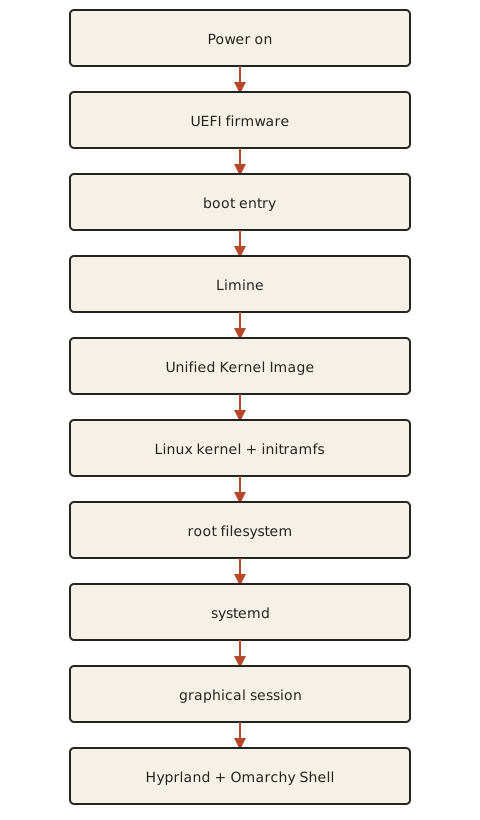
Each layer has a different responsibility.
This matters because:
failure before kernel
≠
failure after kernel
The recovery approach depends on which layer failed.
20.2 — UEFI vs Legacy BIOS
Modern systems normally boot using:
UEFIrather than legacy BIOS mode.
UEFI provides:
- standardized boot entries;
- EFI System Partition support;
- Secure Boot capability;
- firmware boot menus;
- direct loading of EFI binaries.
Current Omarchy installations should be treated as UEFI systems unless verified otherwise.
20.3 — Verify UEFI Mode
A useful command is:
bootctl statusEven if systemd-boot is not your bootloader, bootctl status can still expose useful firmware/EFI information.
You can also inspect:
ls /sys/firmware/efiIf this directory exists:
system is booted in UEFI mode20.4 — Real Course Workstation Firmware
The workstation used in this course reported:
UEFI 2.70This confirmed a modern UEFI boot environment.
The exact firmware version on your machine will differ.
Do not copy version numbers.
20.5 — What the Bootloader Does
The bootloader sits between firmware and the kernel.
Its job is to make boot choices and load the selected boot target.
Examples of bootloaders include:
Limine
GRUB
systemd-boot
Different Linux setups choose different ones.
Omarchy currently uses Limine in its supported modern setup.
20.6 — Verify the Bootloader Instead of Assuming
The workstation used in this course initially looked like it might be using GRUB.
After inspection, it was actually using:
Limine 12.8.0This is a key course lesson.
Use evidence.
Do not infer the bootloader from:
- an old tutorial;
- what another Arch install used;
- what Windows dual boot normally looks like;
- what you vaguely remember selecting.
20.7 — Limine
Limine is the current bootloader used by the course workstation and the current Omarchy snapshot workflow.
Its responsibilities include:
- presenting boot entries;
- loading the Omarchy UKI;
- exposing bootable snapshots;
- providing a recovery path when a recent system update breaks root state.
This makes Limine important beyond normal boot.
It is part of recovery.
20.8 — Current Course Workstation Limine Version
The workstation used while developing this course had:
Limine 12.8.0Treat this as a historical verification point, not a version requirement.
Your current Omarchy installation may use a newer version.
20.9 — EFI System Partition
UEFI boots EFI programs stored on an EFI System Partition.
You may see paths such as:
/boot/EFI/A modern Linux boot installation often places EFI executables here.
On the course workstation:
/boot/EFI/Linux/omarchy_linux.efiwas the active Omarchy Unified Kernel Image.
20.10 — What Is a Unified Kernel Image?
A Unified Kernel Image, or:
UKIbundles boot-critical components into one EFI executable.
Conceptually:
Linux kernel
+
initramfs
+
kernel command line
+
metadata
+
EFI stub
        ↓
one .efi file
Instead of firmware/bootloader loading several separate boot pieces, it can load one unified EFI image.
20.11 — Why UKIs Are Useful
A UKI can improve:
- boot-chain simplicity;
- signing;
- Secure Boot integration;
- reproducibility;
- measured boot workflows;
- bootloader interoperability.
For Omarchy learners, the main practical point is:
The thing Limine boots may be one
.efiimage containing the kernel and early userspace pieces.
20.12 — systemd-stub
A UKI normally includes an EFI stub.
On the course workstation, inspection identified:
systemd-stub 261.2-1-archThe stub is what allows the combined image to behave as an EFI executable.
It participates in handing control from firmware/bootloader into the Linux kernel.
20.13 — Active Omarchy Boot Entry
The workstation used in this course had an active entry:
Omarchy.linuxand the UKI:
/boot/EFI/Linux/omarchy_linux.efiThis gives us a concrete verified chain:
UEFI
↓
Limine
↓
Omarchy.linux
↓
omarchy_linux.efi
↓
kernel
20.14 — Inspect EFI Boot Entries
Use:
efibootmgrif installed.
This can show:
- boot order;
- firmware boot entries;
- Windows Boot Manager;
- Limine/Omarchy-related entries.
Example concepts:
Boot0000* Windows Boot Manager
Boot0001* Limine
Exact numbering differs by machine.
20.15 — Boot Order
UEFI firmware stores a boot order.
Conceptually:
1. Limine
2. Windows Boot Manager
3. USB device
4. network boot
Your actual boot order is firmware-specific.
Do not change it unless you understand the consequence.
20.16 — Firmware Boot Menu
Most systems provide a one-time boot menu key.
Examples vary by vendor:
F8
F11
F12
Esc
This can be extremely useful.
It lets you choose:
- Limine;
- Windows Boot Manager;
- USB recovery media;
without permanently changing boot order.
20.17 — Dual Boot Architecture
In a Windows + Omarchy system, the firmware may contain separate boot entries:
Windows Boot Manager
Limine / Omarchy
The machine does not need GRUB merely because it dual boots.
This is exactly why bootloader assumptions are dangerous.
20.18 — Windows and Secure Boot
Modern Windows installations often expect Secure Boot availability, especially for some security features.
But:
Secure Boot capableand:
Secure Boot currently enabledare separate states.
The course workstation had:
Secure Boot disabledduring Omarchy installation/use.
20.19 — TPM 2.0
The course workstation had:
TPM 2.0 availableTPM is a hardware-backed security component used for things such as:
- key protection;
- measured boot;
- device security;
- Windows BitLocker-related workflows.
TPM presence does not automatically mean:
Secure Boot enabledThese technologies can work together, but they are not the same thing.
20.20 — Secure Boot
Secure Boot is a UEFI feature that verifies trusted signatures in the boot chain.
Conceptually:
firmware trusts key
↓
EFI executable signature verified
↓
boot continues
If an untrusted/unsigned boot image is encountered:
boot can be blockeddepending on configuration.
20.21 — Secure Boot Is Not “Windows Mode”
Secure Boot is a UEFI security technology.
It is not inherently Windows-only.
Linux can use Secure Boot too when the boot chain is configured and signed appropriately.
The challenge is not:
Linux cannot use Secure BootThe challenge is:
the specific Linux boot chain must be prepared for it20.22 — Do Not Enable Secure Boot Blindly
If Omarchy currently boots with Secure Boot disabled:
do not simply enable it in firmwareunless the current boot chain is prepared.
Possible outcome:
firmware rejects the Linux boot imageThen Omarchy will stop booting even though the installation itself is healthy.
20.23 — Prepare Recovery First
Before any Secure Boot experiment:
1. know how to enter firmware
2. know how to disable Secure Boot again
3. know the Limine entry
4. know the Windows Boot Manager entry
5. have recovery media available
6. confirm important data is backed up
Only then experiment.
20.24 — Windows BitLocker Consideration
If Windows uses BitLocker or device encryption, firmware/security changes can trigger recovery-key prompts.
Before changing:
- Secure Boot;
- TPM settings;
- boot order;
- firmware security settings;
make sure the Windows recovery key is available.
This is especially important on dual-boot machines.
20.25 — Fast Startup
Windows Fast Startup can complicate dual-boot disk access because Windows may leave filesystems in a hybrid hibernation state.
For shared filesystems between Windows and Linux, disabling Fast Startup is commonly recommended.
This is a dual-boot hygiene issue, not specifically a Limine issue.
20.26 — Secure Boot and Signed UKIs
A UKI architecture is well suited to Secure Boot because:
one EFI imagecan be signed.
But successful Secure Boot still depends on:
- trusted keys;
- current Omarchy signing workflow;
- firmware trust configuration;
- bootloader/UKI integration.
Do not invent a signing procedure.
Use the current official Omarchy guidance for the current release.
20.27 — Why This Course Is Version-Aware Here
Boot/security tooling changes.
The exact supported Secure Boot workflow may evolve with:
- Omarchy releases;
- Limine changes;
- systemd-stub changes;
- kernel tooling;
- signing infrastructure.
Therefore this handbook teaches:
architecture
+
verification
+
recovery preparation
and tells learners to follow the current official Secure Boot procedure at execution time.
20.28 — Bootable Snapshots and Limine
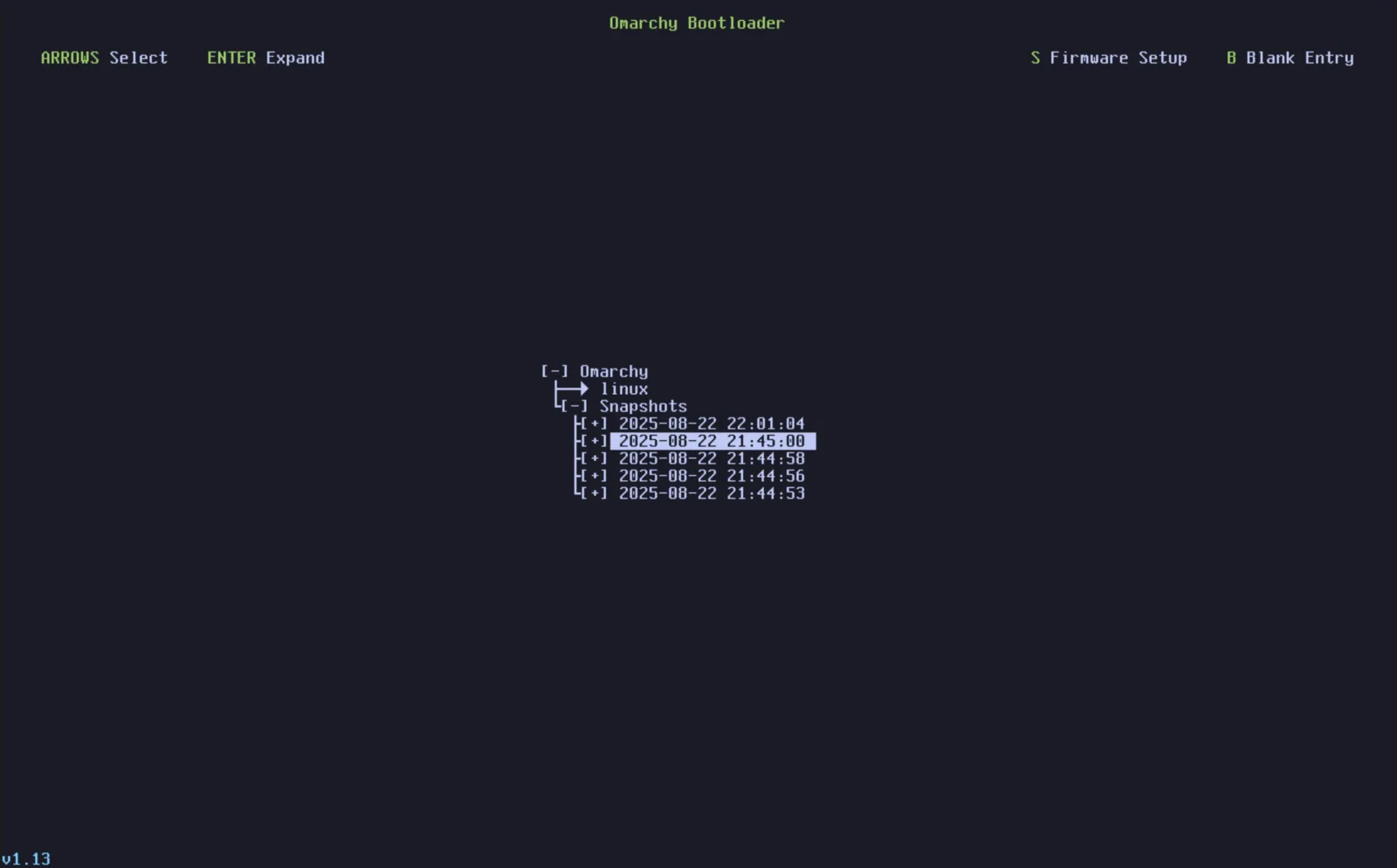
Current Omarchy snapshot recovery integrates with Limine.
After an update snapshot is created, boot entries can expose historical root snapshots.
Conceptually:
normal Omarchy
snapshot before update A
snapshot before update B
This means the bootloader is part of the recovery system.
20.29 — Why Direct Boot Changes Recovery Convenience
If Omarchy is configured to boot directly without showing Limine:
normal startup becomes faster/cleanerbut snapshot access becomes less visible.
You may need the firmware boot menu to reach Limine.
This is a trade-off:
convenience
vs
visible recovery access
20.30 — Keep Recovery Discoverable
For a learning workstation, it is useful to know how to reach Limine.
Do not optimize away every recovery screen before you understand it.
A two-second convenience gain is not worth losing confidence during a broken update.
20.31 — Kernel
After the UKI loads, the Linux kernel takes control.
Verify the running kernel:
uname -rThe course workstation previously reported:
7.2.3-arch1-3That is only a historical point from this build.
Your current kernel will change over time.
20.32 — Kernel on Disk vs Running Kernel
After a kernel package update:
new kernel may exist on diskwhile:
old kernel is still running in memoryuntil reboot.
This is one reason Omarchy may request a reboot after updates.
20.33 — Initramfs
The initramfs is early userspace used during boot before the real root filesystem is fully available.
In a UKI, initramfs content is bundled into the unified image.
Problems here can prevent the root filesystem from mounting.
Symptoms may include:
- early boot failure;
- emergency shell;
- root-device errors.
This is earlier than Hyprland or Omarchy Shell.
20.34 — systemd
Once the kernel/initramfs hands off to the real root filesystem, systemd starts system services.
At this point:
bootloader already succeeded
kernel already succeeded
root filesystem mounted
If the machine reaches a TTY but not the graphical desktop:
the bootloader/UKI probably workedThe problem is likely later in userspace.
20.35 — Graphical Session
The graphical layer includes:
- user session;
- Hyprland;
- Omarchy Shell;
- user services.
If:
Ctrl + Alt + F2gives a working TTY:
the machine booted significantly further than firmware/bootloaderThis is a useful diagnostic boundary.
20.36 — Failure Classification
Use this rough map.
Firmware/Boot Entry Failure
Symptoms:
no Limine
wrong OS boots
firmware says no boot device
Investigate:
- firmware boot order;
- EFI entries;
- EFI partition.
Bootloader/UKI Failure
Symptoms:
Limine appears
Omarchy entry fails before kernel/userland
Investigate:
- UKI;
- snapshot;
- Secure Boot;
- boot entry.
Kernel/Initramfs Failure
Symptoms:
kernel starts
root mount/emergency failure
Investigate:
- kernel;
- initramfs;
- storage/root filesystem.
Userspace/Graphical Failure
Symptoms:
TTY works
desktop does not
Investigate:
- services;
- Hyprland;
- user config;
- shell.
20.37 — Why Failure Classification Saves Time
Without classification:
desktop won't start
→ reinstall bootloader?
That may be completely wrong.
If TTY works, the bootloader already did its job.
Likewise:
firmware cannot find Linux
→ edit Hyprland config?
That cannot help.
Always identify how far the boot got.
20.38 — Verify Boot State Before Changing Anything
Useful commands:
uname -rbootctl statusefibootmgrls -lh /boot/EFI/Linuxfind /boot -maxdepth 3 -type f | sortUse only the commands that make sense for your system.
20.39 — Inspect the UKI
List:
ls -lh /boot/EFI/LinuxOn the course workstation, the important file was:
omarchy_linux.efiDo not rename/delete boot images casually.
20.40 — Do Not Manually Delete “Old-Looking” EFI Files
A file may be:
- active;
- recovery-related;
- snapshot-related;
- referenced by firmware/bootloader.
Boot storage is not a place for casual cleanup.
Use supported Omarchy maintenance tools.
20.41 — Boot Entry vs File
These are different.
UEFI boot entry
→ metadata stored in firmware NVRAM
EFI file
→ executable on EFI System PartitionThe boot entry points toward a file/loader.
Deleting either layer can break boot.
20.42 — Limine Entry vs UKI Entry
Depending on current configuration, firmware may start:
Limineand Limine then loads:
Omarchy UKIDo not assume firmware directly loads the UKI.
Verify the actual chain.
20.43 — Practical Exercise: Verify UEFI
Run:
test -d /sys/firmware/efi && echo "UEFI mode"Then:
bootctl statusRecord:
firmware mode
Secure Boot state
TPM availability if shown
Do not change anything.
20.44 — Practical Exercise: Inspect EFI Entries
Run:
efibootmgrIdentify:
- current BootOrder;
- Windows Boot Manager if dual boot;
- Limine/Omarchy-related entry.
Take a screenshot for the course.
Do not modify BootOrder.
20.45 — Practical Exercise: Inspect Boot Files
Run:
find /boot/EFI -maxdepth 3 -type f | sortIdentify:
Omarchy UKI
Windows EFI loader
Limine EFI files
depending on your actual system.
Do not delete anything.
20.46 — Practical Exercise: Verify the Running Kernel
Run:
uname -rRecord the result.
Then compare after a future kernel update/reboot.
This helps explain:
installed kernel
vs
running kernel
20.47 — Practical Exercise: Verify Secure Boot State
Use:
bootctl statusor another current supported inspection tool.
Record:
Secure Boot:
enabled / disabled
Do not enable it as part of this exercise.
This module teaches understanding first.
20.48 — Practical Exercise: Verify TPM
Use your current firmware/system tooling to verify TPM 2.0.
Possible tools can include:
systemd-analyze has-tpm2if available on the current system.
Record:
TPM 2.0 available?Again:
TPM available
≠
Secure Boot enabled
20.49 — Practical Exercise: Snapshot Boot Path
Do not restore anything.
Restart when convenient and observe Limine.
Identify:
- normal Omarchy entry;
- available snapshot entries.
Then boot normally.
This gives you a visual memory of the recovery path.
20.50 — Practical Exercise: Identify Windows Boot Path
On dual-boot systems:
use the one-time firmware boot menu.
Identify:
Windows Boot Manager
Limine
Do not change permanent boot order.
The goal is knowing your escape paths.
20.51 — Practical Exercise: Build a Boot Recovery Note
Record:
Firmware entry key:
Boot menu key:
Omarchy bootloader:
Windows entry:
Secure Boot current state:
TPM:
UKI path:
Snapshot access path:
USB installer location:
Windows recovery key location:
Do not store the actual BitLocker recovery secret inside a public dotfiles repository.
Record where it is safely stored, not the secret itself.
20.52 — Before Enabling Secure Boot Later
Create this checklist:
[ ] current official Omarchy Secure Boot guide checked
[ ] important data backed up
[ ] Windows BitLocker recovery key available
[ ] firmware boot menu known
[ ] Secure Boot disable path known
[ ] Limine entry verified
[ ] Omarchy UKI verified
[ ] recovery USB available
Only then consider the change.
20.53 — Common Boot Mistakes
Mistake 1 — Assuming GRUB
Verify the actual bootloader.
The course workstation used Limine.
Mistake 2 — Enabling Secure Boot Without Preparing Linux
You can make a healthy Linux installation unbootable.
Mistake 3 — Confusing TPM With Secure Boot
They are different security technologies.
Mistake 4 — Changing TPM/Secure Boot With BitLocker Enabled and No Recovery Key
Windows may request recovery.
Mistake 5 — Deleting EFI Files to “Clean Up”
Boot files are not normal cache files.
Mistake 6 — Editing Hyprland to Fix a Firmware Boot Failure
Classify the failure layer first.
Mistake 7 — Reinstalling the Bootloader When TTY Already Works
If userspace is running, the bootloader likely succeeded.
Mistake 8 — Forgetting Snapshot Access After Enabling Direct Boot
Know how to reach Limine through firmware.
Mistake 9 — Assuming the New Kernel Is Running Immediately After Package Update
Reboot is required to load it.
Mistake 10 — Following an Old Secure Boot Tutorial Blindly
Use current official Omarchy guidance for the installed release.
20.54 — Checkpoint
Before moving on, you should be able to answer yes to the following.
Boot Architecture
- I understand UEFI → bootloader → UKI → kernel → userspace.
- I understand what Limine does.
- I understand what a UKI is.
- I understand systemd-stub at a high level.
- I understand initramfs at a high level.
Verification
- I can verify UEFI mode.
- I can inspect EFI boot entries.
- I can inspect the Omarchy UKI path.
- I can check the running kernel.
- I can verify Secure Boot state.
- I understand TPM availability is separate.
Recovery
- I know how to reach Limine.
- I know how snapshots fit into boot recovery.
- I know how to use the firmware one-time boot menu.
- I know Windows Boot Manager may exist separately.
Secure Boot
- I understand Secure Boot conceptually.
- I know not to enable it blindly.
- I understand signed boot images are required.
- I understand Windows BitLocker can react to firmware/security changes.
- I know to use the current official Omarchy procedure before enabling it.
Troubleshooting
- I can distinguish firmware, bootloader, kernel, and userspace failures.
- I understand that a working TTY proves the machine booted well past the bootloader.
- I know not to apply desktop fixes to pre-kernel boot problems.
20.55 — What You Can Now Do
After completing Module 20, you can now:
- understand the full Omarchy boot chain;
- verify UEFI state;
- identify the real bootloader;
- inspect firmware boot entries;
- understand the role of Limine;
- identify the active UKI;
- understand how snapshots become bootable recovery points;
- distinguish TPM from Secure Boot;
- prepare safely for future Secure Boot changes;
- account for Windows/BitLocker in dual boot;
- classify boot failures by layer;
- choose recovery actions based on how far the machine actually booted.
Most importantly:
You no longer treat “the computer doesn’t boot normally” as one giant problem. You can identify which layer failed.
Module 20 Summary
Modern Omarchy boot chain:
Power
↓
UEFI
↓
Limine
↓
Unified Kernel Image
↓
kernel + initramfs
↓
systemd
↓
Hyprland
↓
Omarchy Shell
Course workstation verified:
UEFI 2.70
Limine 12.8.0
TPM 2.0 available
Secure Boot disabled
Omarchy.linux
/boot/EFI/Linux/omarchy_linux.efi
systemd-stub 261.2-1-arch
These are examples from one real workstation, not fixed requirements.
Useful inspection:
bootctl statusefibootmgruname -rls -lh /boot/EFI/LinuxFailure classification:
firmware cannot find boot target
→ firmware/EFI layer

Limine appears but Omarchy target fails
→ bootloader/UKI layer

kernel starts but root fails
→ kernel/initramfs/storage layer

TTY works but desktop fails
→ userspace/session layer
Secure Boot:
capable
≠
enabled
TPM:
present
≠
Secure Boot enabled
Dual boot:
Limine
+
Windows Boot Manager
can coexist as separate UEFI entries.
And the most important rule:
Verify the actual boot chain before trying to repair it.