Module 22: Reproducible Workstation Setup on Omarchy
In this module — 91 sections
- What You Will Learn
- 22.1 — Reproducibility Is Not “Clone My Entire Home Directory”
- 22.2 — Four Recovery/Rebuild Layers
- 22.3 — Layer 1: System
- 22.4 — Layer 2: User Configuration
- 22.5 — Layer 3: Development Tools
- 22.6 — Layer 4: Projects and Personal Data
- 22.7 — Dotfiles
- 22.8 — What Should Go Into Your Dotfiles Repository?
- 22.9 — Preserve Hyprland Configuration
- 22.10 — Preserve Omarchy Shell Configuration
- 22.11 — Preserve Hooks
- 22.12 — Preserve Personal Menu Extensions
- 22.13 — Preserve Bash Customization
- 22.14 — Preserve XCompose
- 22.15 — Preserve Personal Scripts
- 22.16 — Personal Themes and Backgrounds
- 22.17 — Mise Global Configuration
- 22.18 — Project mise.toml Is More Important Than Global Versions
- 22.19 — Do Not Use .mise.toml Unless Your Current Workflow Explicitly Requires It
- 22.20 — Capture Default Applications
- 22.21 — Capture Important Omarchy Preferences
- 22.22 — Portable vs Machine-Specific Config
- 22.23 — One Repository Can Still Support Multiple Machines
- 22.24 — Alternative: Host-Aware Config
- 22.25 — Do Not Commit Generated Runtime State Blindly
- 22.26 — Do Not Commit Secrets
- 22.27 — Private Repository Is Not a Secret Vault
- 22.28 — SSH Keys Should Not Be in Dotfiles Git
- 22.29 — Build a Dotfiles Repository
- 22.30 — Do Not Immediately Symlink Everything
- 22.31 — Simple Copy-Based Bootstrap
- 22.32 — Symlink-Based Bootstrap
- 22.33 — GNU Stow
- 22.34 — Chezmoi
- 22.35 — GitHub Repository
- 22.36 — README as Rebuild Documentation
- 22.37 — Example README Structure
- 22.38 — Package Reproducibility
- 22.39 — Build an Installation Manifest
- 22.40 — Why Not Save the Entire pacman -Q List?
- 22.41 — Record Manual Hardware Fixes
- 22.42 — Record Monitor Rules
- 22.43 — Record Keyboard-Specific Changes
- 22.44 — Record Boot Facts, Not Secrets
- 22.45 — Build a Bootstrap Script
- 22.46 — Idempotence
- 22.47 — Fail Early
- 22.48 — Interactive Bootstrap Is Fine
- 22.49 — Verification Script
- 22.50 — Verify Defaults
- 22.51 — Verify Development Runtimes
- 22.52 — Verify GitHub Authentication
- 22.53 — Verify Keybindings
- 22.54 — Verify Hardware
- 22.55 — Rebuild Order Matters
- 22.56 — Why Update Before Applying Old Dotfiles?
- 22.57 — Current Omarchy Updates Can Change Config Expectations
- 22.58 — Version Your Dotfiles Changes
- 22.59 — Commit Small Logical Changes
- 22.60 — Do Not Auto-Commit Runtime Noise
- 22.61 — System Snapshots and Dotfiles Complement Each Other
- 22.62 — Personal Data Backup
- 22.63 — New Machine Drill
- 22.64 — Rebuild Gaps Are Documentation Bugs
- 22.65 — Current Omarchy Unattended Installation
- 22.66 — Unattended Install Use Cases
- 22.67 — Current cidata Inputs
- 22.68 — authorized_keys Has Security Consequences
- 22.69 — Tailscale Provisioning
- 22.70 — defer-provisioning
- 22.71 — Unattended Install Is Not a Dotfiles Replacement
- 22.72 — Full Reproducibility Stack
- 22.73 — A Stevinator Rebuild Manifest
- 22.74 — Example Workstation Manifest
- 22.75 — Practical Exercise: Inventory Your Current Config
- 22.76 — Practical Exercise: Create the Dotfiles Repo
- 22.77 — Practical Exercise: Copy Hyprland Config
- 22.78 — Practical Exercise: Copy Omarchy User Config
- 22.79 — Practical Exercise: Copy Bash/Mise
- 22.80 — Practical Exercise: Add .gitignore
- 22.81 — Practical Exercise: First Commit
- 22.82 — Practical Exercise: Push Private Repo
- 22.83 — Practical Exercise: Create WORKSTATION.md
- 22.84 — Practical Exercise: Create bootstrap.sh
- 22.85 — Practical Exercise: Create verify.sh
- 22.86 — Practical Exercise: Rebuild in a VM
- 22.87 — Common Reproducibility Mistakes
- 22.88 — Checkpoint
- 22.89 — What You Can Now Do
- Module 22 Summary
About This Module
You now have a heavily customized Omarchy workstation.
The next question is:
Could you rebuild it from scratch without relying on memory?
If the answer is no, the workstation is not yet truly yours.
A reproducible workstation means that the important parts of your setup are captured in durable, inspectable files and procedures.
That includes:
- personal configuration;
- development runtimes;
- defaults;
- scripts;
- hooks;
- project conventions;
- keybindings;
- monitor/input settings;
- package/tool choices;
- recovery notes.
Current Omarchy already provides a clean foundation for this because your personal configuration lives primarily under:
~/.configwhile Omarchy-owned files live under:
/usr/share/omarchyCurrent official docs explicitly recommend backing up your dotfiles if you customize Omarchy heavily.
This module turns that recommendation into a complete workstation-rebuild strategy.
The goal is:
A new machine should become your machine through a deliberate, documented process—not through weeks of rediscovering old tweaks.
What You Will Learn
By the end of Module 22, you will understand:
- what “reproducible workstation” actually means;
- which Omarchy files are worth preserving;
- which files should not be committed;
- how to build a dotfiles repository;
- how to separate machine-specific from portable configuration;
- how to preserve your Hyprland setup safely;
- how to preserve Omarchy Shell configuration;
- how to preserve Bash, XCompose, hooks, scripts, and personal themes;
- how to capture default applications;
- how to capture mise-managed runtimes;
- how project-level
mise.tomlimproves reproducibility; - how to document packages and Omarchy-integrated app choices;
- how to bootstrap a new machine in layers;
- how to avoid committing secrets;
- how Git, snapshots, backups, and unattended installs solve different problems;
- how current Omarchy unattended installation can reproduce base machines;
- how to build a practical rebuild checklist;
- how to test whether your setup is actually reproducible.
22.1 — Reproducibility Is Not “Clone My Entire Home Directory”
A naive backup strategy is:
copy everything in /home
→ paste onto new machine
That can preserve a lot of state.
It can also preserve:
- caches;
- stale sessions;
- machine-specific files;
- old sockets;
- secrets;
- incompatible app state;
- junk.
A reproducible workstation should preserve intentional configuration, not accidental runtime debris.
22.2 — Four Recovery/Rebuild Layers
Think of your workstation as four separate layers.
1. System layer
2. User configuration layer
3. Development-tool layer
4. Project/data layer
Each should have its own recovery strategy.
22.3 — Layer 1: System
This includes:
- Omarchy installation;
- partitioning;
- bootloader;
- kernel;
- system packages;
- full-disk encryption;
- firmware/boot state.
Rebuild tool:
Omarchy installerRecovery tool:
system snapshotThis layer should not be reconstructed from a copied root filesystem by default.
22.4 — Layer 2: User Configuration
This includes:
~/.config/hypr
~/.config/omarchy
~/.bashrc
~/.XCompose
~/.config/mise
personal scripts
hooks
themes
Rebuild tool:
dotfiles repositoryCurrent official Omarchy docs explicitly treat ~/.config as the user-owned configuration layer and /usr/share/omarchy as Omarchy-owned.
22.5 — Layer 3: Development Tools
This includes:
- Node;
- Python;
- Bun;
- other runtimes;
- CLI tools;
- GitHub CLI;
- project environment managers.
Rebuild tool:
mise
+
Omarchy install/pkg workflows
+
documented package list
Current Omarchy relies heavily on mise for development environments.
22.6 — Layer 4: Projects and Personal Data
This includes:
- source repositories;
- documents;
- notes;
- local databases;
- assets;
- personal media.
Rebuild/recovery tools:
Git remotes
+
backups
+
cloud/storage sync
This layer is not replaced by system snapshots or dotfiles.
22.7 — Dotfiles
“Dotfiles” usually refers to personal configuration files whose names often begin with:
.Examples:
.bashrc
.config/
.XCompose
.gitconfig
Current Omarchy documentation explicitly refers to the user’s configuration as dotfiles.
22.8 — What Should Go Into Your Dotfiles Repository?
For an Omarchy developer workstation, a strong baseline is:
hypr/
omarchy/
mise/
bash/
scripts/
git/
or a layout preserving real paths.
Important files include:
~/.config/hypr/hyprland.lua
~/.config/hypr/bindings.lua
~/.config/hypr/monitors.lua
~/.config/hypr/input.lua
~/.config/hypr/looknfeel.lua
~/.config/hypr/autostart.lua
~/.config/omarchy/shell.json
~/.bashrc
~/.XCompose
~/.config/mise/config.toml
Current Omarchy’s official dotfiles documentation highlights these exact user-controlled files.
22.9 — Preserve Hyprland Configuration
Your Hyprland personal layer is one of the most valuable things to preserve.
Current key files:
hyprland.lua
bindings.lua
monitors.lua
input.lua
looknfeel.lua
autostart.lua
These define:
- monitor configuration;
- input behavior;
- shortcuts;
- autostart;
- appearance/layout overrides.
22.10 — Preserve Omarchy Shell Configuration
Current Omarchy Shell user state lives in:
~/.config/omarchy/shell.jsonCurrent official docs identify this file as controlling shell behavior including:
- bar;
- widgets;
- idle/screen behavior;
- shell customization.
If you customize the bar or shell state, preserve it intentionally.
22.11 — Preserve Hooks
Current user hooks live under:
~/.config/omarchy/hooksIf you built:
- post-boot hooks;
- post-update hooks;
- theme hooks;
those are part of your workstation logic.
Version the scripts themselves.
Do not rely on memory.
22.12 — Preserve Personal Menu Extensions
Current Omarchy supports personal menu extensions in:
~/.config/omarchy/extensions/omarchy-menu.jsoncCurrent official docs say this file can add or override Omarchy menu rows.
If you use custom menu items:
include this file22.13 — Preserve Bash Customization
Current official Omarchy docs say personal:
- aliases;
- shell functions;
- exports;
belong in:
~/.bashrcand that this file is not overwritten by Omarchy updates.
That makes it a natural dotfiles candidate.
22.14 — Preserve XCompose
If you customize:
~/.XComposeinclude it.
This can contain:
- quick-access text;
- emoji sequences;
- name/email shortcuts;
- custom compose sequences.
Do not include sensitive data you would not want in your Git repository.
22.15 — Preserve Personal Scripts
A strong location is:
~/.local/binfor your own executables.
Examples:
open-project-workspace
backup-dotfiles
record-workstation-state
development helpers
If a keybinding depends on a script:
the script is part of the keybindingand must be reproducible too.
22.16 — Personal Themes and Backgrounds
If you created custom themes:
~/.config/omarchy/themesand custom backgrounds:
~/.config/omarchy/backgroundsconsider versioning them.
Be careful with:
- large images;
- copyrighted assets;
- huge repositories.
For large wallpapers, a separate asset repository or backup may be more appropriate.
22.17 — Mise Global Configuration
Your global mise configuration usually lives under:
~/.config/mise/config.tomlThis may define global tools such as:
Node
Python
Bun
The course workstation currently uses:
Node 26.8.1
Python 3.13.15
Bun 1.4.2
as global development tools.
Those exact versions are not permanent requirements.
The important thing is preserving the intended config.
22.18 — Project mise.toml Is More Important Than Global Versions
The workstation can change.
The project should remain reproducible.
Example:
global Node
→ 26

project
→ Node 24
The project should declare:
mise.tomlso a new machine can recreate the required runtime.
This is why project-level configuration beats relying on the developer’s global environment.
22.19 — Do Not Use .mise.toml Unless Your Current Workflow Explicitly Requires It
A real course correction:
Current project setup uses:
mise.tomlnot:
.mise.tomlThis is another useful “verify current behavior” example.
22.20 — Capture Default Applications
Your workstation should document:
Browser
Terminal
Editor
Agent
Example from the course machine:
Browser: Chromium
Terminal: Ghostty
Editor: Neovim
Agent: OMP
These can change over time.
A rebuild script/checklist should set or verify them.
22.21 — Capture Important Omarchy Preferences
Examples:
Theme: Catppuccin
Background: Waves
Font: JetBrainsMono Nerd Font
Monitor: DP-2 2560x1440@144
Mouse sensitivity: -0.3
Mouse accel: flat
Do not hard-code another person’s hardware identifiers.
Document your machine.
22.22 — Portable vs Machine-Specific Config
This distinction is one of the hardest parts of dotfiles.
Portable:
editor preference
theme
shell aliases
general keybindings
Git config
mise config
Machine-specific:
monitor output name
resolution
GPU-specific config
laptop touchpad settings
Bluetooth hardware state
Do not assume the same config should apply unchanged everywhere.
22.23 — One Repository Can Still Support Multiple Machines
You can organize machine-specific files explicitly.
Example:
dotfiles/
├── common/
├── desktop/
├── laptop/
└── install/
Then:
common
→ all machines

desktop
→ desktop-only monitor/input settings

laptop
→ laptop-only power/touchpad/display settings
This avoids fragile hostname conditionals everywhere.
22.24 — Alternative: Host-Aware Config
You may choose to branch logic based on:
hostnameExample conceptually:
if desktop
→ load desktop monitor config

if laptop
→ load laptop config
This can work.
But keep it readable.
If the logic becomes complex, separate files are better.
22.25 — Do Not Commit Generated Runtime State Blindly
Avoid committing things like:
- caches;
- sockets;
- logs;
- lock files;
- session databases;
- browser profiles;
- application caches;
- temporary files.
Version:
intentnot:
everything under ~/.config22.26 — Do Not Commit Secrets
Never put secrets into a public dotfiles repository.
Common risks:
API keys
Wi-Fi passwords
SSH private keys
GitHub tokens
cloud credentials
password-manager exports
browser cookies
Tailscale auth keys
If a file mixes configuration and secrets:
split themor use a private secret-management mechanism.
22.27 — Private Repository Is Not a Secret Vault
A private GitHub repository reduces exposure.
It does not make committed secrets risk-free.
Reasons:
- account compromise;
- accidental repository visibility change;
- collaborator access;
- local clone compromise;
- Git history persistence.
Do not normalize storing production credentials in Git simply because the repository is private.
22.28 — SSH Keys Should Not Be in Dotfiles Git
Do not commit:
~/.ssh/id_ed25519or other private keys.
Public keys may be stored safely in appropriate contexts.
Private keys belong in protected credential storage/backup.
22.29 — Build a Dotfiles Repository
One simple approach:
mkdir -p ~/Projects/dotfiles
cd ~/Projects/dotfiles
git init
Then create a clean structure.
Example:
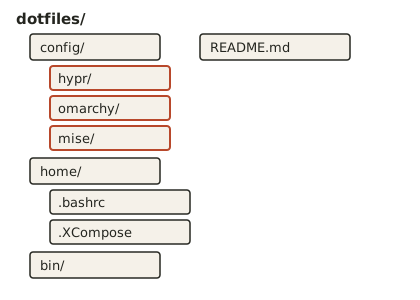
This keeps the repository understandable.
22.30 — Do Not Immediately Symlink Everything
Symlink-based dotfile managers are useful.
But they introduce another abstraction.
For this course, first understand:
which files matterThen choose whether to manage them with:
- manual copy;
- symlinks;
- GNU Stow;
- chezmoi;
- another tool.
The method is secondary.
22.31 — Simple Copy-Based Bootstrap
A beginner-friendly bootstrap can:
copy repo files into expected locationsExample concept:
mkdir -p ~/.config/hypr
cp config/hypr/*.lua ~/.config/hypr/
This is explicit and easy to debug.
Later, you can replace it with a more advanced dotfiles manager.
22.32 — Symlink-Based Bootstrap
Symlinks make the repository the live source of truth.
Conceptually:
~/.config/hypr/bindings.lua
→ ~/Projects/dotfiles/config/hypr/bindings.lua
Advantages:
- edit live config in repo;
- easy Git diff;
- no sync step.
Disadvantages:
- mistakes affect live config immediately;
- some tools dislike symlinks;
- path structure becomes more important.
Use deliberately.
22.33 — GNU Stow
GNU Stow is a popular dotfiles approach.
Structure:
dotfiles/
└── hypr/
    └── .config/
        └── hypr/
Then:
stow hyprcreates symlinks into the home directory.
This is useful, but not Omarchy-specific.
Do not add complexity unless it helps you.
22.34 — Chezmoi
Chezmoi can manage:
- templates;
- machine differences;
- secrets integration;
- multi-machine dotfiles.
It is powerful.
It is also more complex.
For a single Omarchy workstation:
plain Git repomay be enough.
Choose the simplest tool that solves your real problem.
22.35 — GitHub Repository
After initial commit:
git add .
git commit -m "chore: bootstrap Omarchy dotfiles"
Create a private GitHub repository:
gh repo create omarchy-dotfiles --private --source=. --remote=origin --pushThis gives you:
- remote history;
- off-machine copy;
- easy new-machine access.
Do not confuse this with a full personal-data backup.
22.36 — README as Rebuild Documentation
Your dotfiles repository should include:
README.mdwith:
- supported machines;
- prerequisites;
- install order;
- manual steps;
- defaults;
- optional steps;
- secrets required but not stored;
- verification commands.
This is the human-readable source of truth.
22.37 — Example README Structure
## Omarchy Workstation

### Baseline

- Omarchy stable
- Ghostty
- Neovim
- Chromium
- OMP
- Catppuccin
- JetBrainsMono Nerd Font

### Install Order

1. Install Omarchy
2. Run Omarchy update
3. Clone this repo
4. Apply common configs
5. Apply machine-specific configs
6. Install development tools
7. Set defaults
8. Authenticate GitHub
9. Restore secrets manually
10. Verify workstation

### Machine-Specific

#### Desktop
- DP-2
- 2560x1440@144
- scale 1

### Secrets Not Stored Here

- SSH private keys
- API keys
- browser credentials
Simple, explicit, useful.
22.38 — Package Reproducibility
There are three major installation layers from Module 6:
omarchy pkg
omarchy install
mise
Your rebuild documentation should record which layer owns each tool.
Example:
system package
→ wev

Omarchy-integrated app
→ Ghostty

mise runtime
→ Node
This prevents reinstalling the same tool through conflicting layers.
22.39 — Build an Installation Manifest
Create:
packages.mdor:
workstation.tomldocumenting intentional software.
Example:
Omarchy-integrated:
- Ghostty
- Chromium

System:
- wev

Mise global:
- node
- python
- bun

Optional:
- Docker: no
- Go: no
- Rust: no
This is more useful than dumping every installed package.
22.40 — Why Not Save the Entire pacman -Q List?
Because it contains:
- dependencies;
- base packages;
- transitive packages;
- Omarchy internals.
Reinstalling every package blindly can:
- fight current Omarchy defaults;
- reintroduce obsolete packages;
- preserve old dependency state.
Capture:
intentional additionsrather than the full package database.
22.41 — Record Manual Hardware Fixes
The course workstation has an important example:
NuPhyIO required a udev rule for the keyboard configuration tool.
That kind of machine-specific fix must be documented.
Otherwise, a rebuild produces:
everything works
except one mystery hardware utility
Document:
- what was changed;
- why;
- exact file path;
- verification command.
22.42 — Record Monitor Rules
Course workstation:
DP-2
2560x1440@144
scale 1
That belongs in machine-specific documentation.
On a new GPU/port, the output might become:
DP-1so the rebuild process should verify:
hyprctl monitors allbefore blindly applying the old rule.
22.43 — Record Keyboard-Specific Changes
The NuPhy Kick75 required Fn-layer work for a Print-key behavior.
That is not a generic Omarchy config.
Document it as:
hardware-specific setupalong with:
wevverification.
This keeps portable and hardware-specific logic separate.
22.44 — Record Boot Facts, Not Secrets
Useful boot documentation:
bootloader: Limine
Secure Boot: disabled
TPM2: available
UKI path: /boot/EFI/Linux/omarchy_linux.efi
Windows dual boot: yes/no
Do not store:
- BitLocker recovery key;
- disk passphrase;
- private keys.
Record where secrets are stored safely.
22.45 — Build a Bootstrap Script
Once the manual process is understood, automate it.
Example high-level script:
#!/usr/bin/env bash
set -euo pipefail

echo "Applying Omarchy workstation configuration..."

## copy/symlink dotfiles
## install intentional packages
## install mise tools
## set defaults
## verify current state
Do not make the first version fully unattended.
Start with visible, reversible steps.
22.46 — Idempotence
A good bootstrap script should ideally be:
safe to run more than onceThat property is called:
idempotenceExample:
Bad:
echo 'export FOO=bar' >> ~/.bashrcevery run duplicates the line.
Better:
copy a managed fileor test before adding.
22.47 — Fail Early
Use:
set -euo pipefailcarefully in scripts so unexpected errors stop the bootstrap.
But understand what those options do before relying on them.
For beginners, a readable sequence with explicit checks can be safer than clever shell automation.
22.48 — Interactive Bootstrap Is Fine
A rebuild script can ask:
Desktop or laptop?
Install Docker?
Set Ghostty as default?
Authenticate GitHub now?
Full zero-touch automation is not required for reproducibility.
The important part is:
repeatable decisions22.49 — Verification Script
A separate:
verify.shis extremely useful.
It can check:
omarchy version
git --version
gh --version
mise --version
hyprctl monitors all
and verify expected config files exist.
A rebuild is not complete until it is verified.
22.50 — Verify Defaults
Your verification script can inspect:
omarchy default browser
omarchy default terminal
omarchy default editor
omarchy default agent
using current supported commands.
Do not assume install order automatically yields the desired defaults.
22.51 — Verify Development Runtimes
Example:
mise ls --currentFor a project:
cd ~/Projects/projectinator
mise ls --current
This checks:
global workstation environment
+
project-specific environment
22.52 — Verify GitHub Authentication
Run:
gh auth statusAuthentication is intentionally not stored in dotfiles.
The rebuild process should include:
authenticate accountas a manual secure step.
22.53 — Verify Keybindings
Open:
Super + K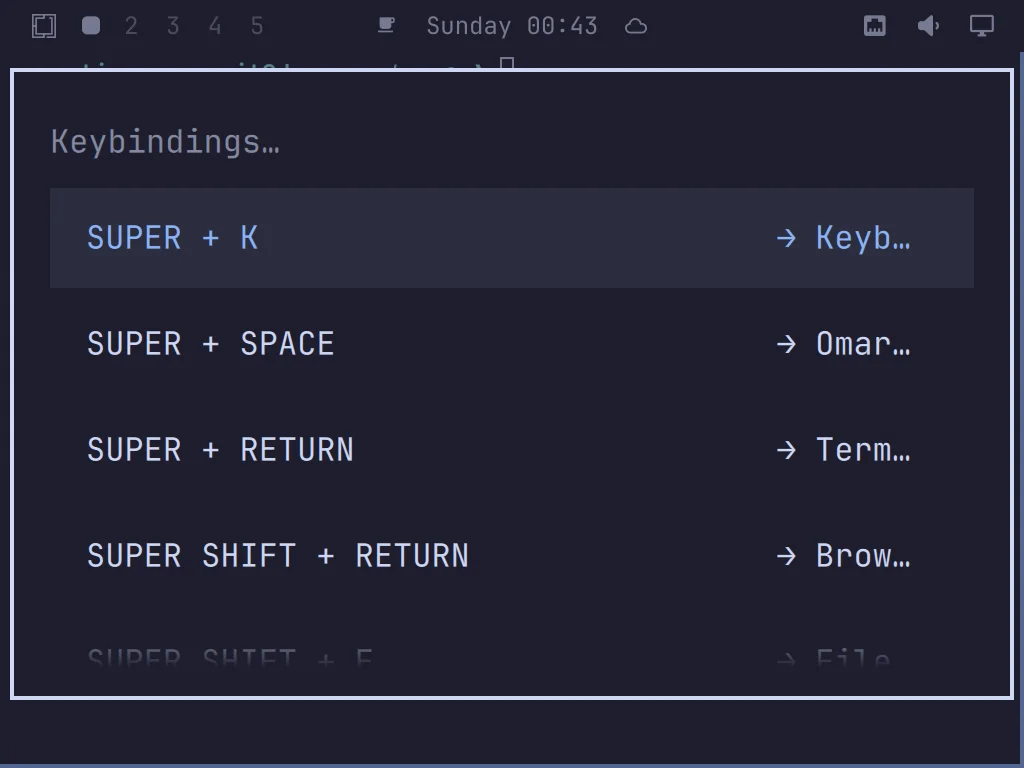
or use current CLI output.
Check critical custom shortcuts:
Tmux launcher
project launcher
personal utilities
Do not test every shortcut manually unless necessary.
22.54 — Verify Hardware
Run:
hyprctl monitors allwevif keyboard mapping matters.
Check:
- audio;
- Wi-Fi;
- Bluetooth;
- GPU;
- input.
This catches machine-specific rebuild gaps.
22.55 — Rebuild Order Matters
Use this order:
1. Install Omarchy
2. Update Omarchy
3. Verify boot/network
4. Clone dotfiles
5. Apply user config
6. Install intentional apps/packages
7. Restore mise tools
8. Set defaults
9. Authenticate external services
10. Apply machine-specific hardware config
11. Restore secrets
12. Clone projects
13. Verify
This avoids configuring tools that are not installed yet.
22.56 — Why Update Before Applying Old Dotfiles?
Your dotfiles should target:
current Omarchynot the install ISO’s potentially older state.
Workflow:
install
→ update
→ apply user config
reduces mismatch between:
- old shipped defaults;
- current user overrides.
22.57 — Current Omarchy Updates Can Change Config Expectations
Omarchy evolves.
A dotfiles repo from six months ago may contain:
- outdated syntax;
- obsolete keys;
- old helper names.
Therefore rebuild should include:
hyprctl configerrorsand current command discovery.
Do not treat reproducibility as:
freeze foreverIt means:
make change explicit and repairable22.58 — Version Your Dotfiles Changes
Before a system/customization experiment:
git status
git add .
git commit -m "chore: checkpoint workstation config"
Then if something breaks:
git diffor:
git restorebecomes available.
This is stronger than remembering:
"I think I changed three files yesterday."22.59 — Commit Small Logical Changes
Good:
feat: add tmux launcher bindingfix: set DP-2 to 144 Hzchore: switch default terminal to GhosttyBad:
update everythingSmall commits make recovery easier.
22.60 — Do Not Auto-Commit Runtime Noise
If some application rewrites config frequently:
git statusmay become noisy.
Decide whether that file is:
- real user intent;
- generated state;
- machine-specific runtime state.
Ignore files that do not belong in reproducible configuration.
22.61 — System Snapshots and Dotfiles Complement Each Other
Current Omarchy snapshots restore root state but not /home. Therefore:
snapshot
→ system rollback

dotfiles Git
→ personal config rollback
Together they cover different failure domains.
Neither replaces real file backups.
22.62 — Personal Data Backup
Your workstation strategy should answer:
Where are non-Git personal files backed up?Examples:
- external disk;
- NAS;
- encrypted cloud storage;
- sync service.
This course does not mandate one provider.
It does mandate that the answer exists.
22.63 — New Machine Drill
A workstation is not reproducible until you have tested the rebuild.
Best test:
VMor:
spare machineTry to recreate your environment using only:
- Omarchy installer;
- dotfiles repo;
- README;
- secure credentials;
- project remotes.
Every time you need to remember something undocumented:
add it to the rebuild process22.64 — Rebuild Gaps Are Documentation Bugs
Suppose during rebuild you discover:
Ghostty theme wrongDo not just fix it manually.
Ask:
Why was this not reproduced?Then update:
- dotfiles;
- bootstrap;
- README;
- verification.
This turns each rebuild into an improvement cycle.
22.65 — Current Omarchy Unattended Installation
Current Omarchy supports unattended ISO installation.
The official docs say that if the installer finds a second drive labeled:
cidatawith supported configuration files, it can skip the setup wizard and complete installation automatically.
This is advanced but extremely relevant to reproducibility.
22.66 — Unattended Install Use Cases
Useful for:
VM templates
Packer builds
Proxmox dev VMs
disposable test machines
lab systems
repeatable workstation imaging
For one personal desktop:
manual install + dotfilesmay still be simpler.
22.67 — Current cidata Inputs
Current official unattended-install docs describe files such as:
user_configuration.json
user_credentials.json
user_full_name.txt
user_email_address.txt
user_encrypt_installation.txt
authorized_keys
tailscale_authkey
Some are optional.
These represent the same basic answers used by the normal installer.
22.68 — authorized_keys Has Security Consequences
Current official unattended docs say that when:
authorized_keysis supplied, the install:
- places the keys for the user;
- enables SSHD;
- opens the firewall appropriately.
This is deliberate remote-access provisioning.
Do not include SSH keys casually in an image workflow.
22.69 — Tailscale Provisioning
Current unattended install also supports:
tailscale_authkeyfor automatic Tailscale onboarding.
This is powerful for remote/disposable machines.
But the auth key is sensitive.
Treat it as a secret provisioning input, not dotfiles content.
22.70 — defer-provisioning
Current official unattended docs support an empty file:
defer-provisioninginstead of predefining personal credentials.
This is useful for:
prepare machine
→ hand it to another owner
→ owner creates user on first boot
This is a cleaner approach for reusable images.
22.71 — Unattended Install Is Not a Dotfiles Replacement
Unattended installer answers:
How do I install the base machine?Dotfiles answer:
How do I make the user environment mine?Mise answers:
How do I reproduce development runtimes?Git/backups answer:
How do I recover projects/data?These are complementary.
22.72 — Full Reproducibility Stack
A strong Omarchy workstation rebuild architecture:
Omarchy ISO / unattended install
        ↓
current Omarchy update
        ↓
dotfiles Git repo
        ↓
intentional packages/apps
        ↓
mise global tools
        ↓
defaults
        ↓
secure authentication
        ↓
machine-specific hardware config
        ↓
project Git clones
        ↓
project mise.toml
        ↓
verification
This is the target system.
22.73 — A Stevinator Rebuild Manifest
Create a file:
WORKSTATION.mdSuggested sections:
Hardware
Boot
Omarchy
Defaults
Theme
Hyprland
Input
Packages
Mise
GitHub
AI Agent
Hooks
Scripts
Security
Secrets
Projects
Verification
Recovery
This becomes the canonical rebuild worksheet.
22.74 — Example Workstation Manifest
## Workstation

### Hardware
- Desktop
- Radeon RX 6800 XT
- BenQ EX3203R on DP-2
- 2560x1440@144
- NuPhy Kick75

### Defaults
- Browser: Chromium
- Terminal: Ghostty
- Editor: Neovim
- Agent: OMP

### Theme
- Catppuccin
- JetBrainsMono Nerd Font

### Development
- Node: managed by mise
- Python: managed by mise
- Bun: managed by mise

### Security
- LUKS enabled
- Secure Boot currently disabled
- TPM2 available
- SSHD disabled unless needed

### Recovery
- Limine
- system snapshots
- dotfiles Git
- personal-data backup
Do not include passwords or private keys.
22.75 — Practical Exercise: Inventory Your Current Config
Run:
ls -la ~/.config/hyprls -la ~/.config/omarchyls -la ~/.config/miseIdentify files you intentionally changed.
Write them down.
22.76 — Practical Exercise: Create the Dotfiles Repo
mkdir -p ~/Projects/omarchy-dotfiles
cd ~/Projects/omarchy-dotfiles
git init
Create:
README.md
WORKSTATION.md
config/
home/
bin/
Do not copy secrets.
22.77 — Practical Exercise: Copy Hyprland Config
Example:
mkdir -p config/hypr
cp ~/.config/hypr/hyprland.lua config/hypr/
cp ~/.config/hypr/bindings.lua config/hypr/
cp ~/.config/hypr/monitors.lua config/hypr/
cp ~/.config/hypr/input.lua config/hypr/
cp ~/.config/hypr/looknfeel.lua config/hypr/
cp ~/.config/hypr/autostart.lua config/hypr/
Then:
git statusReview before adding.
22.78 — Practical Exercise: Copy Omarchy User Config
Copy only intentional user configuration.
Examples:
mkdir -p config/omarchy
cp ~/.config/omarchy/shell.json config/omarchy/
If you use:
- hooks;
- extensions;
- custom themes;
copy those intentionally too.
Do not blindly run:
cp -r ~/.config/omarchy/* ...without reviewing what is there.
22.79 — Practical Exercise: Copy Bash/Mise
Example:
cp ~/.bashrc home/mkdir -p config/mise
cp ~/.config/mise/config.toml config/mise/If:
~/.XComposecontains no sensitive personal values you do not want in Git:
cp ~/.XCompose home/Otherwise sanitize it first.
22.80 — Practical Exercise: Add .gitignore
Create repository-level:
.gitignoreInclude anything that should never enter the repo.
Example categories:
secrets
temporary files
editor swap files
generated caches
large private assets
Do not assume .gitignore protects files already committed.
22.81 — Practical Exercise: First Commit
Review:
git statusgit diff --no-index /dev/null README.mdThen:
git add .
git diff --staged
Inspect carefully for secrets.
Commit:
git commit -m "chore: bootstrap Omarchy workstation config"22.82 — Practical Exercise: Push Private Repo
Using your GitHub account:
gh repo create omarchy-dotfiles --private --source=. --remote=origin --pushIf that repository name already exists, choose another.
Verify:
git remote -v22.83 — Practical Exercise: Create WORKSTATION.md
Document:
current Omarchy version
hardware
monitor
defaults
theme
font
mise tools
custom bindings
hooks
security state
bootloader
recovery
Do not record secrets.
22.84 — Practical Exercise: Create bootstrap.sh
Start simple.
Example structure:
#!/usr/bin/env bash
set -e

echo "Omarchy workstation bootstrap"

mkdir -p "$HOME/.config/hypr"
mkdir -p "$HOME/.config/omarchy"
mkdir -p "$HOME/.config/mise"

## copy configs here
## install tools here
## set defaults here
Do not automate authentication secrets.
22.85 — Practical Exercise: Create verify.sh
Example:
#!/usr/bin/env bash

echo "Omarchy:"
omarchy version

echo
echo "Git:"
git --version

echo
echo "GitHub CLI:"
gh --version

echo
echo "Mise:"
mise --version

echo
echo "Monitors:"
hyprctl monitors all

echo
echo "Current defaults:"
omarchy default browser
omarchy default terminal
omarchy default agent
Adapt to the current installed CLI.
22.86 — Practical Exercise: Rebuild in a VM
Optional but strongly recommended.
Install Omarchy in a VM.
Then try:
1. update
2. clone dotfiles
3. run bootstrap
4. authenticate GitHub
5. run verify
Note every missing step.
Update documentation.
This is the real reproducibility test.
22.87 — Common Reproducibility Mistakes
Mistake 1 — Backing Up All of ~/.config Blindly
Preserve intentional config, not every runtime artifact.
Mistake 2 — Forgetting Scripts Referenced by Keybindings
A config file can depend on external code.
Mistake 3 — Committing Secrets to a Private Repo
Private Git is not a secret vault.
Mistake 4 — Treating System Snapshots as Personal Backups
Snapshots do not restore /home.
Mistake 5 — Capturing Every Installed Package
Record intentional additions, not the whole dependency graph.
Mistake 6 — Applying Desktop Monitor Rules to a Laptop
Separate machine-specific config.
Mistake 7 — Automating Before Understanding the Manual Process
Automation should encode a known-good process.
Mistake 8 — Never Testing the Rebuild
Untested reproducibility is only a theory.
Mistake 9 — Forgetting External Authentication
GitHub, SSH, cloud accounts, and AI credentials require secure reprovisioning.
Mistake 10 — Letting the Dotfiles Repo Drift Away From the Live Machine
Commit intentional changes as they happen.
22.88 — Checkpoint
Before moving on, you should be able to answer yes to the following.
Architecture
- I understand the system, user-config, dev-tool, and project/data layers.
- I understand which recovery mechanism belongs to each layer.
- I understand dotfiles are not full backups.
Dotfiles
- I know which Omarchy/Hyprland files matter.
- I preserve shell, Bash, XCompose, hooks, and scripts intentionally.
- I understand portable vs machine-specific config.
- I avoid committing runtime noise.
Development
- I preserve global mise configuration.
- I understand project
mise.tomlmatters more than global versions. - I document intentional package/tool ownership.
Security
- I do not commit secrets.
- I understand private Git is not a secret manager.
- I do not commit SSH private keys.
- I keep secure authentication as a separate rebuild step.
Automation
- I understand bootstrap scripts should encode a known-good manual process.
- I understand idempotence at a high level.
- I have a verification step.
- I know how to test rebuilds in a VM/spare machine.
Unattended Installation
- I understand what
cidatadoes. - I understand unattended installation reproduces the base system, not the whole user environment.
- I understand
authorized_keysenables remote-access provisioning. - I understand Tailscale auth keys are secrets.
- I understand
defer-provisioning.
22.89 — What You Can Now Do
After completing Module 22, you can now:
- turn your Omarchy customization into a reproducible workstation;
- version your personal configuration;
- separate portable and machine-specific settings;
- preserve Hyprland and Omarchy Shell customizations safely;
- reproduce development runtimes with mise;
- document intentional applications and packages;
- avoid secret leakage in dotfiles;
- rebuild defaults deliberately;
- create bootstrap and verification scripts;
- use GitHub as a remote dotfiles history;
- understand how unattended Omarchy installation fits into larger deployment workflows;
- test your setup on a fresh machine instead of trusting memory.
Most importantly:
You no longer own one carefully tweaked machine. You own a reproducible workstation design.
Module 22 Summary
Reproducibility layers:
System
→ Omarchy installer / snapshots

User config
→ dotfiles Git

Development tools
→ mise + documented install layers

Projects/data
→ Git remotes + backups
Important current Omarchy user config:
~/.config/hypr/
~/.config/omarchy/
~/.config/mise/
~/.bashrc
~/.XCompose
~/.local/bin
Important principle:
/usr/share/omarchy
→ Omarchy-owned

~/.config
→ user-owned
Project runtimes:
mise.tomlRebuild order:
install
↓
update
↓
clone dotfiles
↓
apply config
↓
install tools
↓
restore mise
↓
set defaults
↓
authenticate
↓
apply machine-specific hardware config
↓
clone projects
↓
verify
Advanced base-system automation:
Omarchy ISO
+
cidata
→ unattended install
Critical rule:
dotfiles
≠
secrets
≠
personal data backup
≠
system snapshot
And the most important lesson:
If rebuilding the workstation requires memory, it is not yet reproducible.